How to Make Your Event Multilingual Without Hiring Interpreters: 6 Options Compared
The simplest way to make an event multilingual without hiring interpreters is AI live translation: a tool such as Maestra Live turns each speaker's words into captions or an AI voice in every attendee's language, on their own phone. Five other options cost less or need no software, but each covers less. Here is how all six compare.
Can you run a multilingual event without interpreters?
Yes, for most business events. AI live translation now follows a speaker with about a second of delay, and attendees choose their own language on their phone, so one room can follow a talk in several languages at once. What you give up is the judgement of a trained interpreter: humour, idioms, overlapping speakers and specialist jargon are where AI makes the most mistakes. Interpreters also cost more than many organizers expect. Professional standards call for at least two interpreters per language for simultaneous work, because they take turns to stay accurate, and each is booked by the day, plus booths, headsets and a technician. An event in three languages needs six interpreters before any equipment. Our guide to how simultaneous interpretation works explains the setup in detail. For many events, a mix of the options below gives attendees most of the benefit for less.
What are the 6 options, and how does each work?
Each option covers a different part of an event: live speech, prepared content, or both. The table compares them first, then each option gets a short breakdown.
| Option | Covers live speech | Languages at once | Typical cost | Best for |
| AI live translation | Yes | Many; each attendee picks one | Subscription or day pass | Talks, panels and conferences |
| Translated captions on the main screen | Yes | Usually one per screen | Often included in software you already pay for | Audiences that share one second language |
| Pre-translated slides and subtitles | No, prepared content only | As many as you prepare | Translation time or a translation tool | Slides, handouts and recorded videos |
| Bilingual host | Yes, as summaries | Two | Staff time | Small events with two languages |
| Volunteer interpreters | Yes | One per volunteer | Free or a thank-you | Community and internal events |
| Hybrid human and AI | Yes | Many | Interpreters for the main languages, AI for the rest | Large events with a few key languages |
1. AI live translation
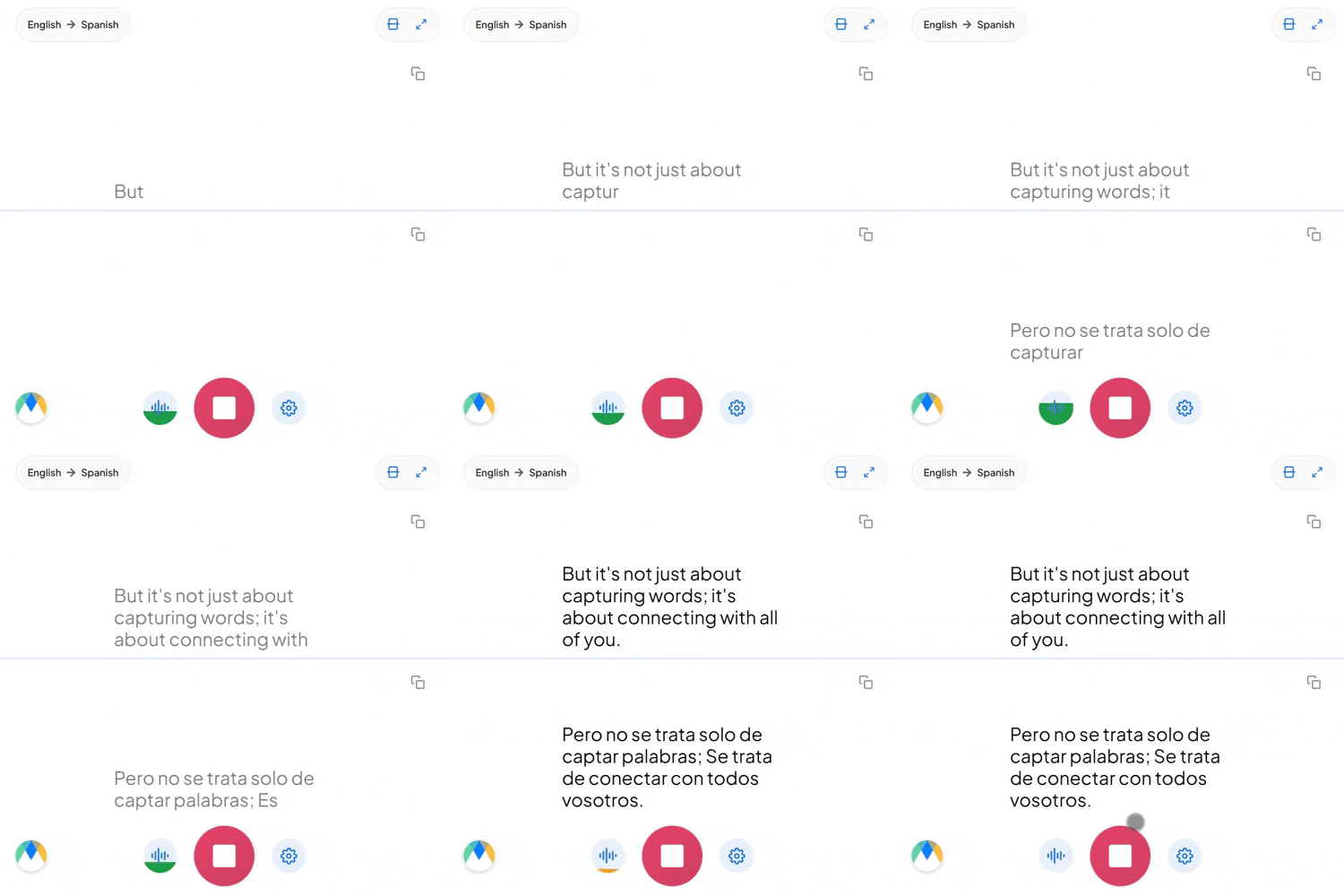
An AI live translation tool listens to the speaker's microphone and sends translated captions or an AI voice to each attendee's phone or laptop. Maestra Live works this way: attendees scan a QR code, pick one of 100+ languages, and read or listen with under one second of delay, with no app or account. Pricing is a subscription rather than per hour. The Organizations plan is $359 a month billed yearly for 3-hour sessions, 3 languages and 50 viewers, and the Events day pass starts at $799 for 3 rooms, 100 viewers per room and 5 languages. Accuracy is highest with one clear speaker and a good microphone, and a translation glossary keeps names and terms consistent. Other tools work in a similar way; our comparison of the best live translation apps covers them. The limit: it is AI only, so it misses some nuance a human interpreter would catch.
2. Translated captions on the main screen
Most presentation and meeting software can now show translated captions on screen while the speaker talks. PowerPoint, Zoom and Microsoft Teams all have a version of it, usually on paid plans, so if your organization already pays for one of them, the cost is often zero. The catch is that a shared screen shows one language at a time. It works when most of the audience shares a second language, not when ten languages are in the room. It is also text only, and attendees at the back of a large hall may struggle to read it.
3. Pre-translated slides and subtitles
Anything prepared in advance can be translated before the event: slides, handouts, signage, agendas and recorded videos. A professional translator, or a translation tool followed by a native speaker's review, gives the most accurate result of any option, because there is time to check every line. Recorded videos can carry subtitles in several languages, and attendees can read the slide text in their own language even when the speaker uses another. Cost depends on volume, and a short deck costs little to translate. The limit is clear: it covers nothing said live, including questions and panel discussions. Use it alongside a live option rather than instead of one.
4. Bilingual host or presenter
A host who speaks both languages can open the event, summarize each talk and run the Q&A in two languages. It costs nothing beyond staff time and feels personal, which suits small community or company events. It does not scale: it works for two languages at most, summaries lose detail, and repeating content in a second language adds speaking time to every session.
5. Volunteer interpreters
Bilingual staff, students or community members can interpret for small groups, usually by whispering next to a few attendees or by interpreting after each sentence. It is free or close to it, and it works for internal meetings, community events and school evenings. The risks are quality and fatigue: untrained interpreters tire quickly, may soften or skip difficult content, and may not keep sensitive information confidential. Brief them in advance, share the slides and agenda, and plan breaks.
6. Hybrid human and AI
Many events combine both. Professional interpreters cover the one or two languages most of the audience needs, and AI live translation covers the rest. Another version uses interpreters for keynotes and AI for breakout rooms, where booking interpreters for every room would be expensive. This keeps human quality where it matters most and still serves smaller language groups. Plan the audio carefully: the interpreters and the AI tool each need a clean feed from the speaker's microphone.
Which option fits which event size?
Event size decides how many people need each language and how many rooms run at once, which narrows the choice quickly.
- Small events (under 30 people): a bilingual host or volunteer interpreter for one extra language, plus translated slides. With two or more extra languages, AI live translation on attendees' phones is simpler.
- Medium events (30 to 200 people): AI live translation for the talks, plus translated slides and videos. Add translated captions on screen if most attendees share one second language.
- Large and multi-room conferences (200+ people): AI live translation in each room, or a hybrid setup with interpreters for the main language. Check viewer limits: Maestra Live's Events day pass allows 100 viewers per room across 3 rooms, and larger audiences need a custom plan.
- Online and hybrid events: translated captions in Zoom or Teams, or an AI live translation tool that connects to them. Maestra Live has apps for Zoom and Microsoft Teams.
Where are human interpreters still the better choice?
Use professional interpreters whenever a translation mistake would have real consequences. That includes legal proceedings and contract negotiations, medical consultations, diplomatic meetings, and any session where a misunderstanding could cause harm. Interpreters also handle humour, emotion and cultural references better, which matters for keynotes where the speaker's style is the point. Two more cases need people. Deaf and hard-of-hearing attendees who use sign language need a sign language interpreter, because captions are not a full replacement. And some less common languages still have weak AI speech support, so test any language before relying on it. For everything else, from training sessions and all-hands meetings to trade show talks, AI and the other options above usually work.
A simple decision flow
Answer these questions in order and stop at the first yes.
- Could a translation mistake cause legal, medical or diplomatic harm? Book professional interpreters.
- Do attendees only need prepared content, such as slides and videos? Pre-translate it; you may not need a live option.
- Is there one extra language and a small audience? A bilingual host or a volunteer interpreter can work.
- Does a large group share one language that deserves human quality? Go hybrid: interpreters for that language, AI for the rest.
- Do several language groups need to follow live speech? Use AI live translation on attendees' phones.
Whatever you choose, run a test with a real speaker and the real room audio before the event. Our guide on how to translate a live presentation includes a 10-minute rehearsal you can run with each speaker.
Make Your Next Event Multilingual
FAQ
For most business talks, yes, when speakers use a good microphone and complete sentences. A glossary of names and terms helps. For legal, medical or diplomatic content, use professional interpreters.
It ranges from nothing (a bilingual host, volunteers, or captions in software you already pay for) to a subscription or day pass for AI live translation. Maestra Live's Organizations plan is $359 a month billed yearly, and its Events day pass starts at $799.
Yes, with AI live translation tools that offer an AI voice, such as Maestra Live, and with human interpreters. Translated captions on a shared screen and pre-translated slides are text only.
With AI live translation, each attendee picks a language, so the limit is the tool and plan. Maestra Live covers 100+ languages, with 3 per session on the Organizations plan and 5 on an Events day pass. Interpreters need a team for each language.
No. Many Deaf attendees rely on sign language, so book a sign language interpreter when they will attend. Captions help many people, including hard-of-hearing attendees, but they are not a full substitute.
