Get Started Free

AI Podcast Transcript Generator

Upload a podcast episode or share the link and receive the transcript in seconds.

HP
Walmart
Bayer
Meta
NHS
Dell
Deloitte
HP
Walmart
Bayer
Meta
NHS
Dell
Deloitte

How to Transcribe a Podcast with Maestra

STEP 1

Upload a Podcast Episode

Upload an audio or video file, then select the audio language from 125+ languages.

STEP 2

Transcribe with AI

Generate and receive the transcript within seconds.

STEP 3

Edit and Export

Edit and style the transcript as you wish, and export it in the format you prefer.

Transcribe Audio & Video Podcasts in 125+ Languages

Generate podcast transcripts quickly and accurately; no matter the format, length, or language.

English
English
Arabic
Arabic
German
German
Turkish
Turkish
French
French
Spanish
Spanish

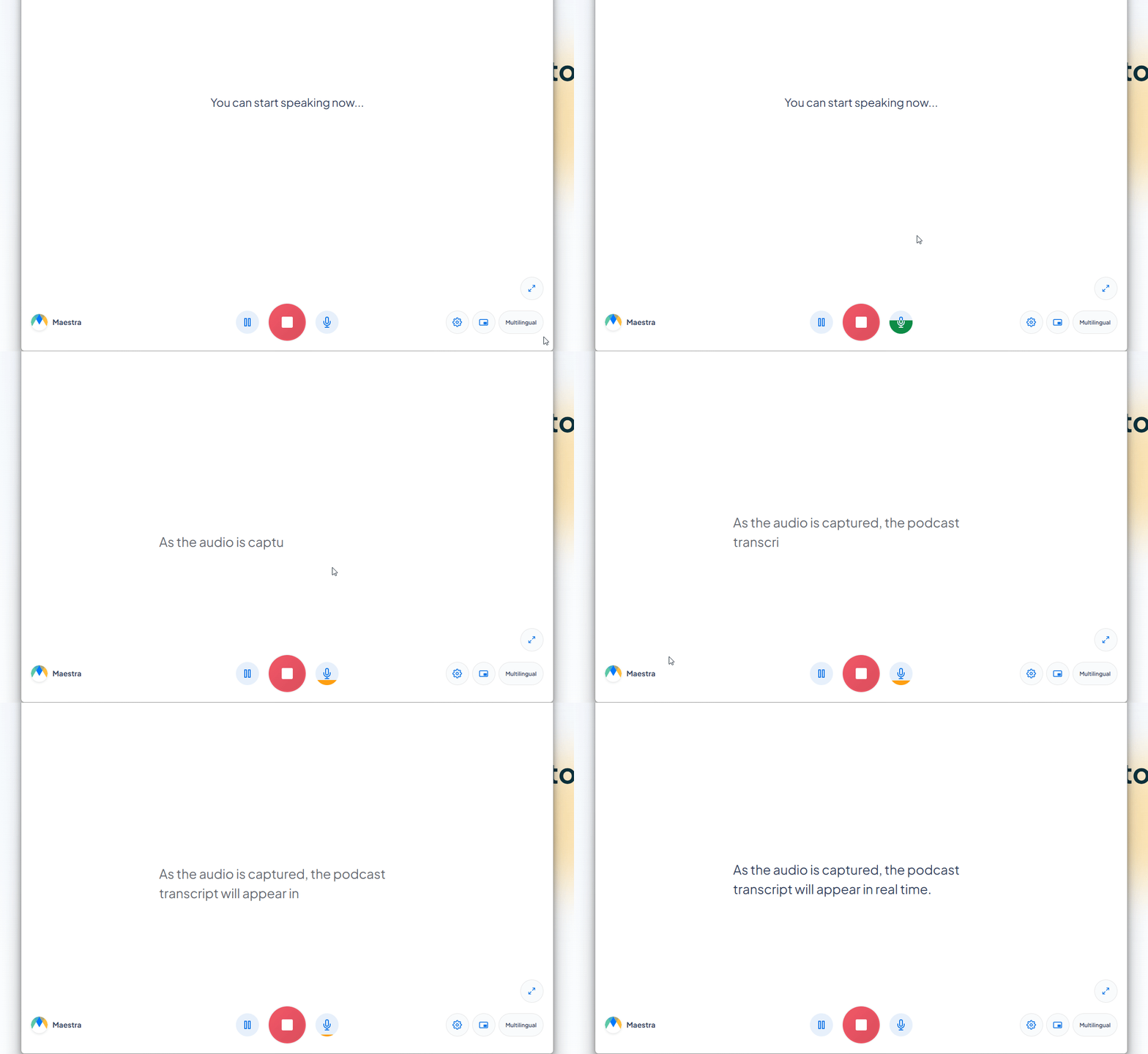
Want to transcribe podcasts as you listen?

Convert episodes to text as they play with Maestra’s free live transcription app, or translate audio instantly with the real-time translator.

Explore Maestra's Podcast Transcript Generator

Maestra’s intuitive features make the transcription process fast and simple for everyone.

01

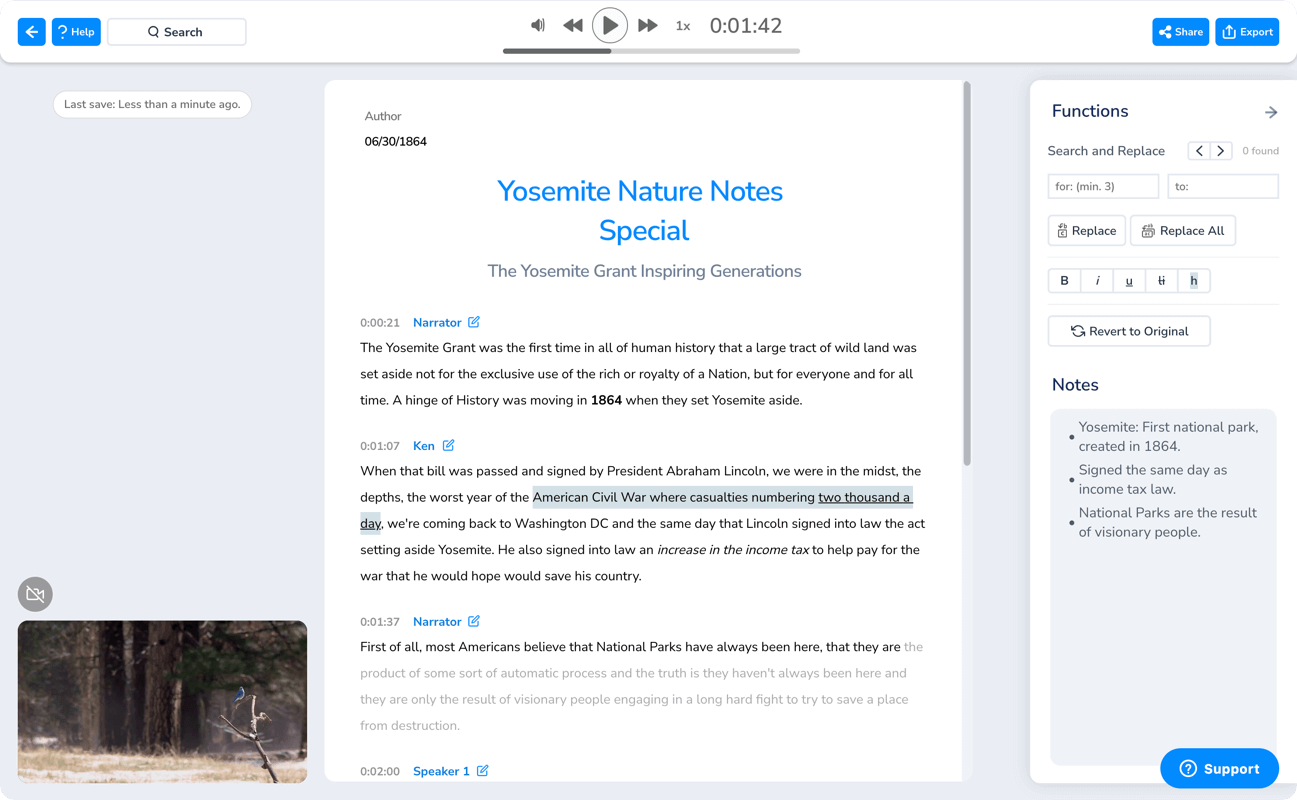
Easy to Use Editor

Quickly edit your transcript: modify text, style it your way, make bulk changes, and find keywords with a single click.

https://cdn.maestra.ai/images/2024/12/30084603/maestra-transcription-2.webp
02

Speaker Identification & Timestamps

Follow the document seamlessly with automatic timestamps and adjust speaker labels for clear identification.

https://cdn.maestra.ai/images/2024/03/18134303/speaker-identification-timestamps.webp
03

Flexible Export

Download your podcast transcript as a TXT, DOCX, PDF, or JSON file depending on your needs.

https://cdn.maestra.ai/images/2024/03/03004826/audio-to-text-2.svg
04

Effortless Collaboration

Share the transcript with co-hosts or others to review, edit, and enhance the content together.

https://cdn.maestra.ai/images/2024/11/13115905/sub-converter-2.webp
05

Responsive Design

Get accurate podcast transcripts in no time whether you’re working on mobile or desktop.

https://cdn.maestra.ai/images/2025/03/28092147/website-content-png-2.png

Generate Podcast Transcripts with AI

Grow Your Audience

Transcribe podcast episodes with AI to maximize accessibility and reach a global audience.
https://cdn.maestra.ai/images/2025/04/10125219/content-creation-2.webp
https://cdn.maestra.ai/images/2024/03/05170210/accuracy-1.png

Boost SEO Performance

Get your podcast indexed with an AI transcript and improve its visibility in search engine results.
https://cdn.maestra.ai/images/2024/02/05165307/interface.png

Repurpose Your Content

Turn your podcast episodes into social media posts, newsletters, blogs, and much more.
https://cdn.maestra.ai/images/2023/12/26080727/accessibility.png

Enhance Listener Experience

Help listeners follow along, search for and revisit specific parts, or read at their own pace.

A Podcast Transcription Service for All

Podcasters

If you’re a podcaster, you can benefit greatly from using an AI podcast transcript generator to streamline your workflow and increase your content’s reach. By converting audio files into text, you can make episodes more accessible to a broader audience, including those who prefer reading over listening. A high-quality podcast transcript also improves search engine optimization, making it easier for listeners to discover your show. Plus, transcripts can be repurposed into show notes that highlight key points and quotes, offering a quick summary. The same text can be adapted into blogs, allowing you to extend your content to different platforms. In the long run, using an AI podcast transcription service can help you stay organized, enhance discoverability, and increase audience engagement.
https://cdn.maestra.ai/images/2024/03/18122246/podcasters.webp

Audiences

As a listener, you can gain significant advantages thanks to a podcast transcript generator. Having a text version of the podcast audio is invaluable if you prefer reading or need to reference specific information. This accessibility extends to individuals with hearing impairments, ensuring they don’t miss out on valuable content. Moreover, if you’re trying to recall a particular point or quote from an episode, a transcript makes the search process incredibly efficient, saving you the time of re-listening. Whether it’s audio or video content, the output from a podcast transcription service enables quick skimming and information retrieval. You can also use the transcript as a source for other projects, such as research papers or blogs. This added flexibility makes transcripts a useful tool for anyone who wants to engage more deeply with podcast content.
https://cdn.maestra.ai/images/2024/03/18122314/audiences.webp

More Podcast Tools by Maestra

https://cdn.maestra.ai/images/2024/08/03090133/subtitleeditor.webp

Auto Subtitle Generator

Add AI-powered subtitles to your video podcasts to make them more inclusive and strengthen audience engagement.

https://cdn.maestra.ai/images/2025/03/28092338/Lipsync-Feature-Instagram-Post.png

AI Podcast Translator

Translate your podcast with AI voices, clone your own voice for multilingual consistency, and lip sync for natural results.

Frequently Asked Questions

How can I transcribe a podcast for free?

You can try Maestra for free to generate a podcast transcript in seconds. Simply upload an audio or video file, and Maestra will accurately convert it to text in 125+ languages . Try it now for free to experience a fast and effortless transcription process.

What is the AI tool for transcribing podcasts?

Maestra is the AI transcription service for converting podcasts to text quickly and efficiently. You can upload a podcast recording and generate an accurate transcript in no time. Get started for free and transform your podcast files into easily readable, searchable transcripts.

Which file formats are supported by Maestra's podcast transcript generator?

Maestra’s podcast transcript generator supports a wide range of file formats including MP3, MP4, WAV, M4A, MOV, and AVI. You can also upload audio or video from URL, such as a YouTube link. Whether it’s a short clip or long-form recording, Maestra processes it with speed and precision.

How many languages does Maestra's podcast transcription service support?

Maestra’s AI podcast transcript generator supports over 125 languages, including Spanish, Chinese, Hindi, Japanese, Arabic, English, and much more. This means users can easily transcribe a podcast for a global audience. Whether you’re creating a bilingual podcast or targeting international markets, Maestra generates accurate, high-quality transcripts that help expand your reach.

In what formats can I download my podcast transcript?

You can download your transcript as a DOCX, TXT, PDF, or JSON file. You can also share the transcript with other users for collaboration and feedback without needing to export the file. Generate a podcast transcript now with Maestra for free to save time and get high-quality text in minutes.

What people are saying about Maestra

4.8 out of 5 stars G2

Chaitanya P.

Managing Director

"Master the Media with Maestra"

The best side of this product is auto subtitling. And most importantly, it supports multiple languages.

Read full review

Ricardo Y.

"The All In One 'over the top' turnkey solution for Automatic Transcripts, Subtitles and Voiceovers"

What comes to mind as Maestra being the go-to solution for our company is that it's such a time and money saver.

Read full review

Matthew S.

CSR

"perfect for anything transcript needs"

The best thing about Maestra is how well it creates transcripts. It's so useful for me. It makes my day a lot easier.

Read full review

Mary M.

Program Development

"Maestra 100% worth the investment in captioning your videos"

Ability to share captioning of our videos with multiple volunteer users is getting our captioning done quickly. Saving time and money with good quality captioning and ease of use.

Read full review

Carolina A. H.

Director

"MAESTRA IS THE GO-TO FOR SUBTITLING. LOVE IT!"

Maestra is just amazing! We were able to produce subtitles in multiple languages assisted by their platform. Multiple users were able to work and collaborate thanks to their super user-friendly interface.

Read full review

Janet S.

Enterprise

"Great product and very easy to use."

Maestra was intuitive to use and created a fairly accurate transcript in the first upload. It is easy to make corrections and ensure accuracy.

Read full review