Get Started Free

Translate Japanese Video to English

Upload a video in Japanese and translate it to English within seconds.

Trusted by teams and individuals at:

HP
Walmart
Bayer
Meta
NHS
Dell
Deloitte
HP
Walmart
Bayer
Meta
NHS
Dell
Deloitte

AI-Powered Japanese to English Video Translator

Translate Japanese videos to English with accurate subtitles, AI dubbing, and lip sync. Handle Japanese scripts and speech patterns naturally across 125+ languages.
Translate Japanese Video to English Now
EnglishEnglish
FrenchFrench
ArabicArabic
GermanGerman
SpanishSpanish
JapaneseJapanese
Translate Japanese Video to English Now

How to Translate a Japanese Video to English

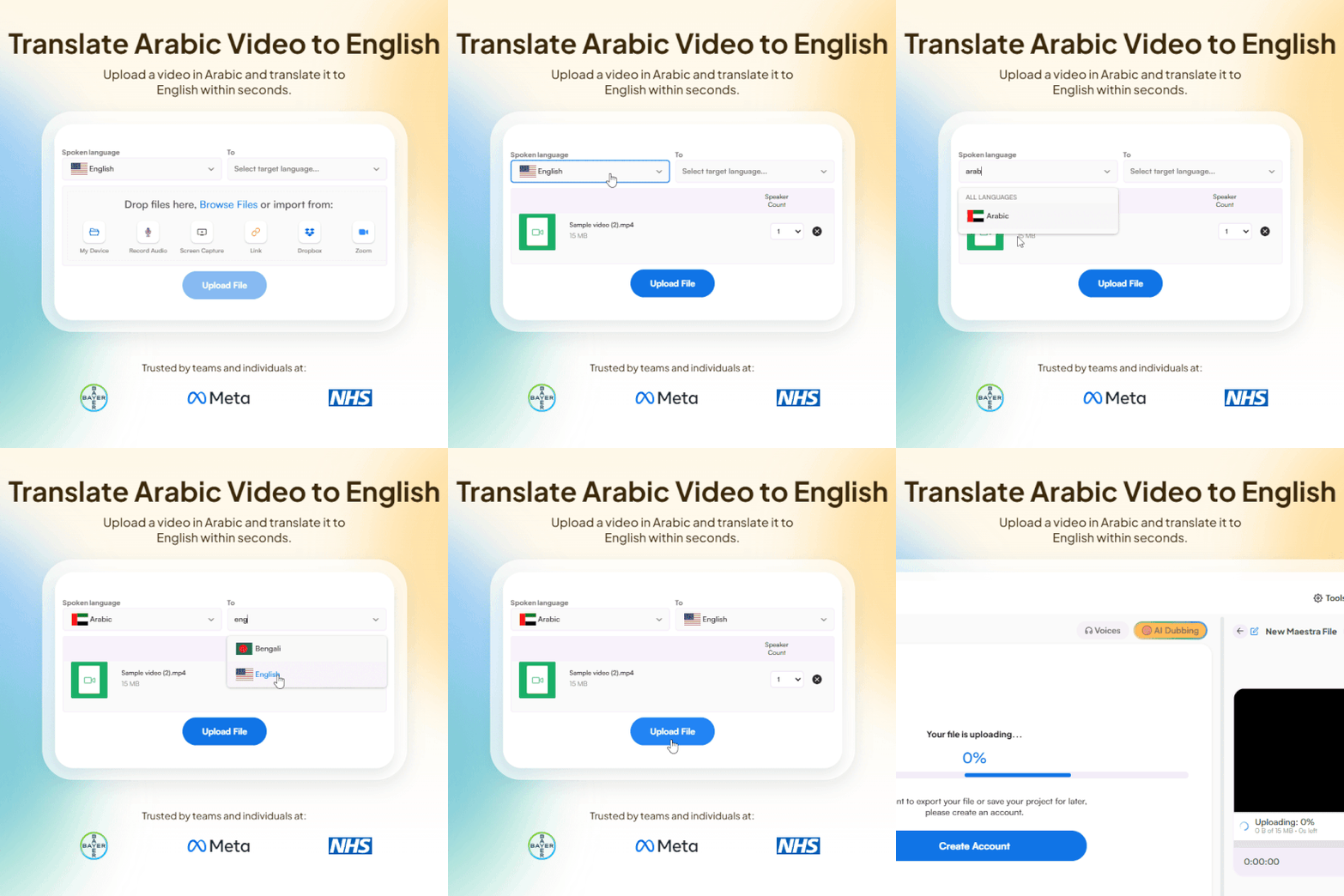
Upload a video file and choose languages
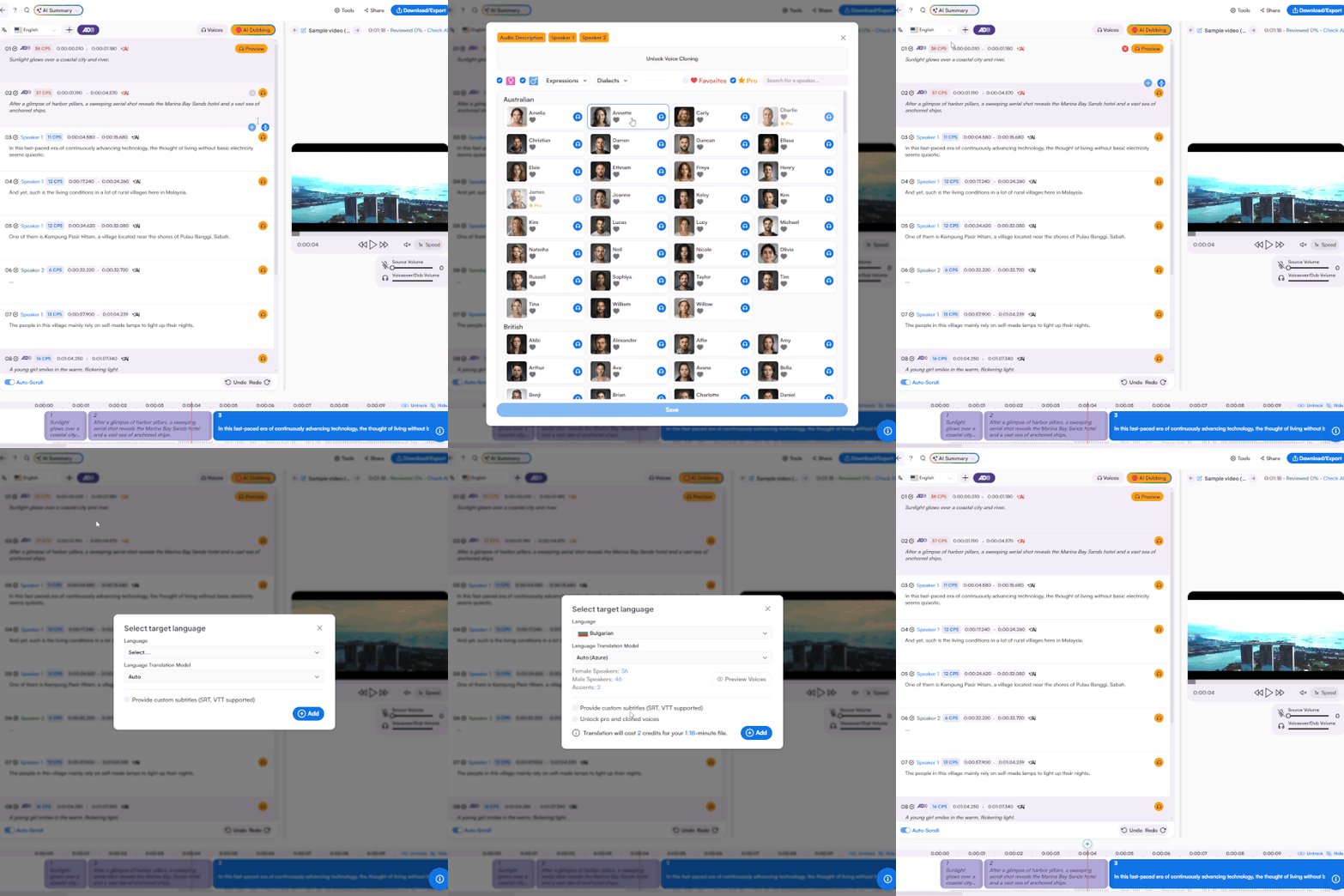
Video translation with subtitles and AI dubbing
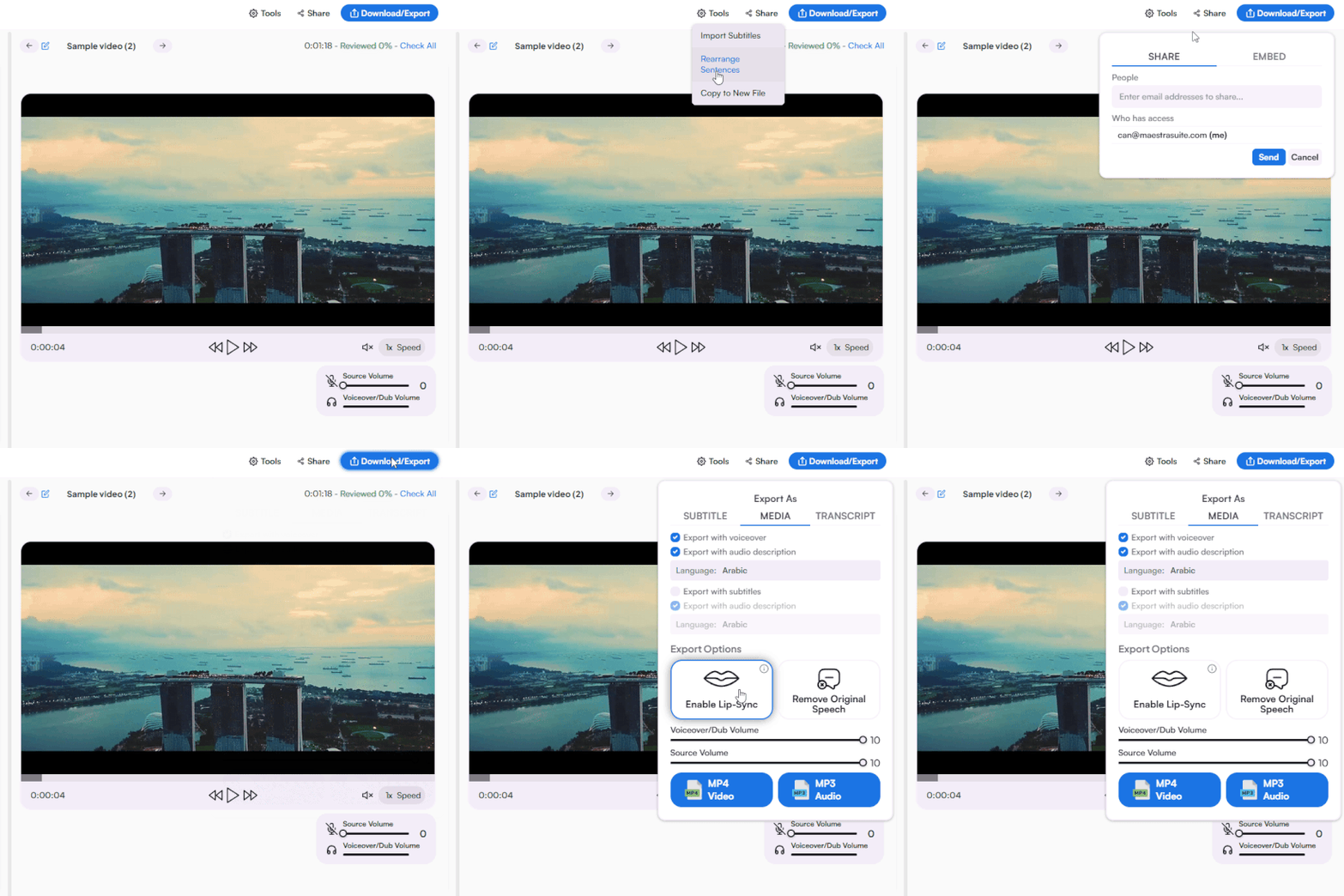
Sharing and exporting options

Japanese to English Video Translator Features

Translate Japanese videos to English with subtitles, dubbing, voice cloning, and seamless platform integrations.

Subtitles & Dubbing

Translate Japanese video to English with burned-in subtitles and AI dubbing. Pair both to maximize accessibility of video content.

Fast & Accurate

Get your Japanese to English video translation back in seconds using the best and latest AI translation technology, ensuring superior accuracy.

AI Voice Cloning & Lip Sync

Clone voices and regenerate them in more languages with lip sync to maintain consistency and immersion.

YouTube & Social Ready

Translate Japanese YouTube videos to English and export in formats optimized for YouTube, TikTok, and other platforms.

Enterprise & API

Access custom enterprise solutions, collaborate with your team in real-time, or automate Japanese to English video translation at scale with the API.

Platform Integrations

Connect with YouTube, TikTok, Zoom, and other platforms to streamline your video translation workflow.
Translate Japanese Videos Now

Customer Reviews

g2

4.8 out of 5 stars

Read all reviews

"Master the Media with Maestra"

The best side of this product is auto subtitling. And most importantly, it supports multiple languages.

Read full review

"The All In One "over the top" turnkey solution for Automatic Transcripts, Subtitles and Voiceovers"

What comes to mind as Maestra being the go-to solution for our company is that it's such a time and money saver.

Read full review

"perfect for anything transcript needs"

The best thing about Maestra is how well it creates transcripts. It's so useful for me. It makes my day a lot easier.

Read full review

"MAESTRA IS THE GO-TO FOR SUBTITLING. LOVE IT!"

Maestra is just amazing! We were able to produce subtitles in multiple languages assisted by their platform. Multiple users were able to work and collaborate thanks to their super user-friendly interface.

Read full review

"Pocket Friendly Content Creator"

It is cloud-based. It allows to automatically transcribe, caption, and voiceover video and audio files to hundreds of languages. It helps to reach and educate people all around the globe.

Read full review

FAQ

How do I translate a Japanese video to English?

Upload your Japanese video, select Japanese as the source language and English as the target, choose subtitles or AI dubbing, and download your translated video in seconds.

Can I add English subtitles to a Japanese video?

Yes. Translate Japanese video to English with burned-in subtitles, AI dubbing, or both. Subtitles are ideal for preserving the original Japanese audio while making content accessible to English speakers.

Is there a free Japanese to English video translator?

Yes. A free trial is available with full access to Japanese to English video translation including subtitles and AI dubbing. No credit card required.

How accurate is Japanese to English video translation?

The translator uses the latest AI models trained to handle Japanese scripts, grammar structures, and speech patterns for high accuracy. You can edit the translation directly in the editor before exporting.

Can I translate Japanese YouTube videos to English?

Yes. Upload your Japanese YouTube video and translate it to English with subtitles, dubbing, or both. You can also add, edit, and manage YouTube subtitles directly from Maestra's interface without leaving the platform.

Can I subtitle, dub, and edit in the same tool?

Yes. Translate, subtitle, dub, and edit your Japanese to English video all from a single interface without switching between separate video translation tools.