Get Started Free

Translate Japanese Audio to English

Upload an audio file in Japanese and translate it to English within seconds.

HP
Walmart
Bayer
Meta
NHS
Dell
Deloitte
HP
Walmart
Bayer
Meta
NHS
Dell
Deloitte

Studio-Quality Japanese to English Audio Translations

Adjust voiceover timing, fine-tune volume balance, control emotional delivery, swap speakers, and refine every detail of your Japanese to English translation directly in the browser. Polish your audio until it sounds like it was produced in a studio, no extra software required.
Voiceover editor

Powered by AI

How to Translate Japanese Audio to English

STEP 1

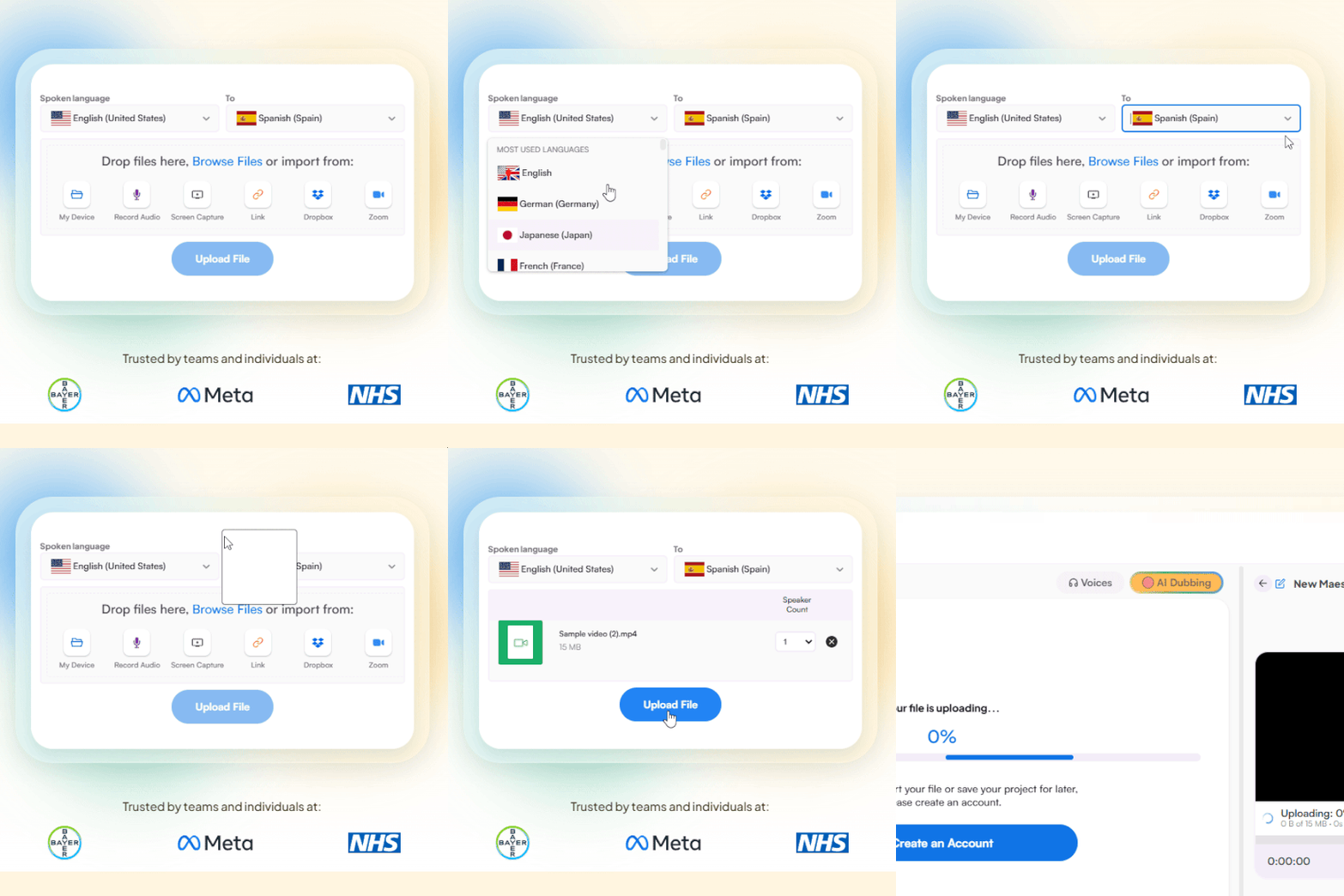
Upload Audio Files

Upload a Japanese audio file from your device, Dropbox, Zoom, or paste a link. Set Japanese as the source language and English as the target.

Upload an audio file and choose languages
STEP 2

Translate Japanese Audio

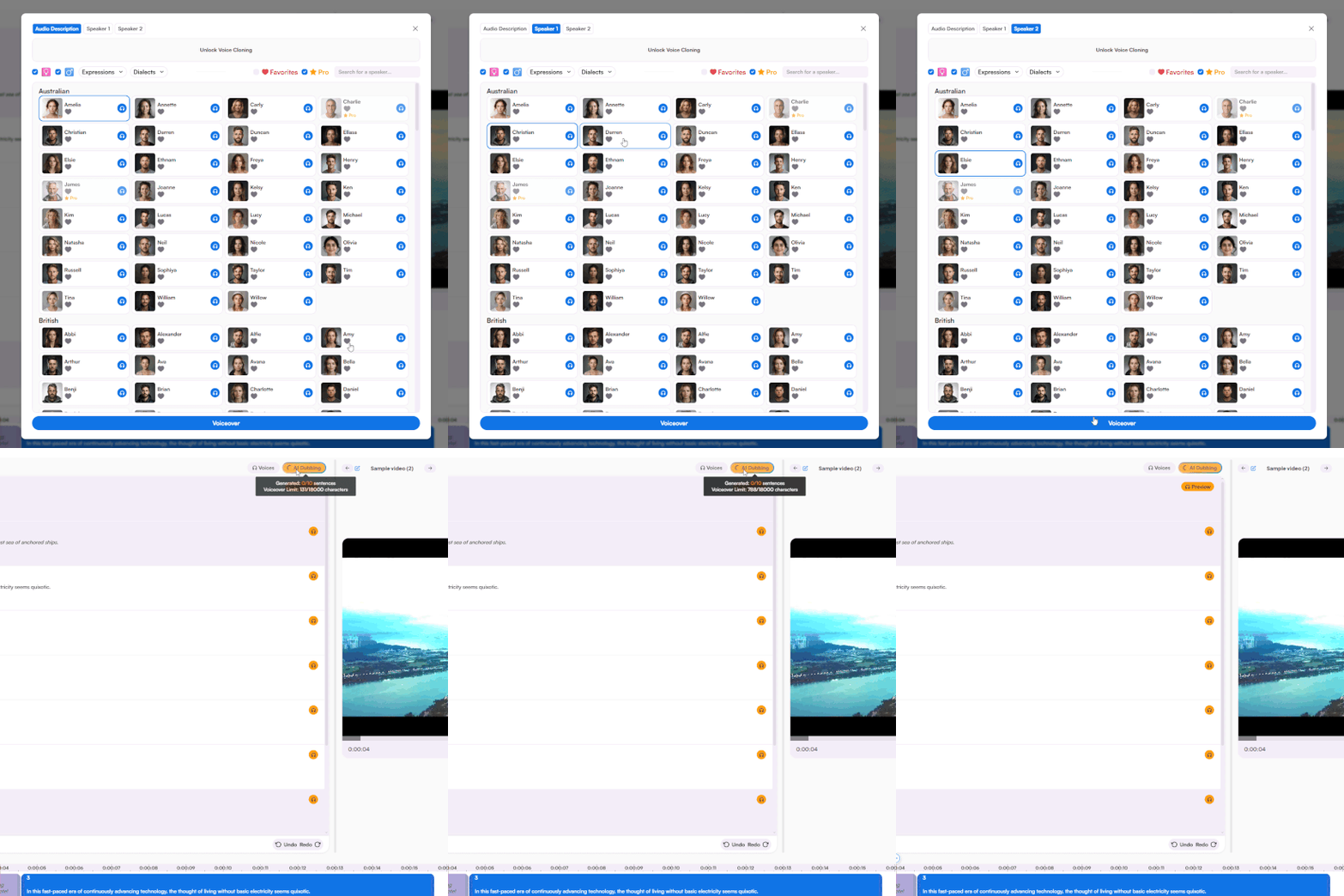
Choose from a rich portfolio of voices and receive the full audio translation to English within minutes. Fine-tune every aspect of the voiceover with a simple yet advanced voiceover editor.

AI voice library and audio translation
STEP 3

Share or Download

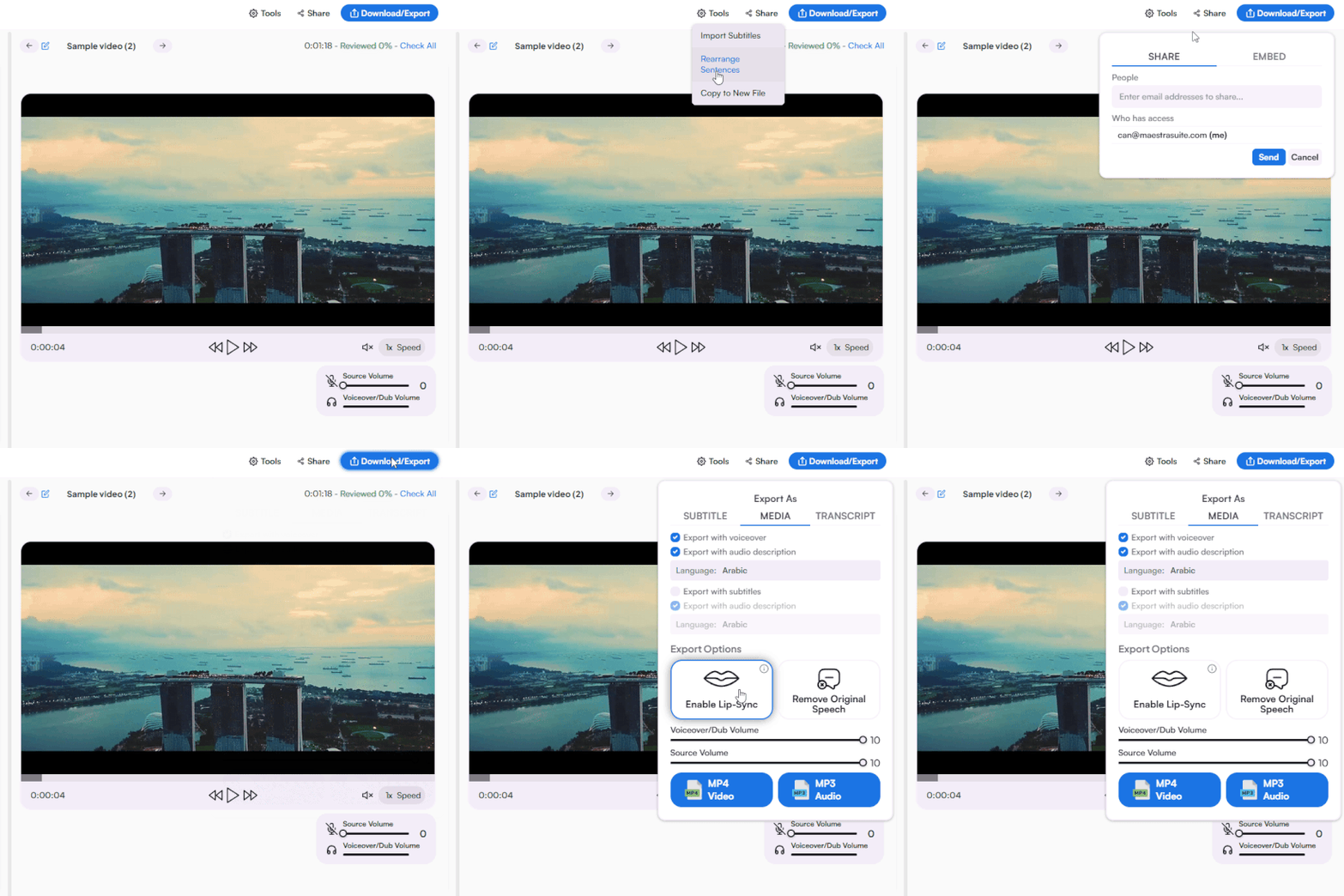
Share to collaborate or export as MP3 or MP4 with English voiceover, along with the option to export as various subtitle and transcript formats.

Exporting and sharing options

Translate Japanese to English Audio with AI

Achieve more than simple Japanese to English audio translation with Maestra AI.

Realistic Audio Translator

Translate Japanese voice recordings with AI voices that capture natural English pacing, tone, and pronunciation.

Voice Cloning & Live Translation

Clone the original speaker's voice or translate Japanese to English voice live during meetings and events.

Built for Japanese Content

Translate Japanese podcasts, songs, anime, and recordings with AI tuned for scripts, pitch accents, and speech registers.

Enterprise, API & Integrations

Scale Japanese to English translation with team workflows, API access, and integrations across YouTube, TikTok, Zoom, Slack, and Zapier.
Translate Japanese Audio Now

Customer Reviews

4.8 out of 5 stars G2

Chaitanya P.

Managing Director

"Master the Media with Maestra"

The best side of this product is auto subtitling. And most importantly, it supports multiple languages.

Read full review

Ricardo Y.

"The All In One 'over the top' turnkey solution for Automatic Transcripts, Subtitles and Voiceovers"

What comes to mind as Maestra being the go-to solution for our company is that it's such a time and money saver.

Read full review

Matthew S.

CSR

"perfect for anything transcript needs"

The best thing about Maestra is how well it creates transcripts. It's so useful for me. It makes my day a lot easier.

Read full review

Mary M.

Program Development

"Maestra 100% worth the investment in captioning your videos"

Ability to share captioning of our videos with multiple volunteer users is getting our captioning done quickly. Saving time and money with good quality captioning and ease of use.

Read full review

Carolina A. H.

Director

"MAESTRA IS THE GO-TO FOR SUBTITLING. LOVE IT!"

Maestra is just amazing! We were able to produce subtitles in multiple languages assisted by their platform. Multiple users were able to work and collaborate thanks to their super user-friendly interface.

Read full review

Janet S.

Enterprise

"Great product and very easy to use."

Maestra was intuitive to use and created a fairly accurate transcript in the first upload. It is easy to make corrections and ensure accuracy.

Read full review

FAQs

How do I translate Japanese audio to English?

Upload your Japanese audio file from your device, Dropbox, Zoom, or paste a link. Set Japanese as the source and English as the target, choose an AI voice, and download your translated audio within seconds. The Japanese to English audio translator works directly in your browser with no installation needed.

Can I translate Japanese to English voice in real-time?

Yes. Real-time audio translation converts Japanese voice to English live during meetings, conferences, webinars, and events. No uploads, no waiting — translation happens as the conversation flows. Both uploaded Japanese audio and live Japanese voice translation are supported.

Is there a free Japanese to English audio translator?

Yes. A free trial is available with access to Japanese to English audio translation, voice cloning, real-time translation, and AI voices. No credit card or account required to start. Continue with affordable pricing plans for higher usage limits.

Can I translate a Japanese song or anime audio to English?

Yes. Upload Japanese songs, anime episodes, J-pop tracks, or any spoken or sung content and translate it to English with AI voices. Export as audio, subtitles, or a full transcript for further editing.

Can I export the Japanese to English audio translation as a transcript?

Every Japanese to English audio translation generates a matching transcript and subtitle file. Download the transcript in TXT, DOCX, PDF, or JSON, or export subtitles in SRT, VTT, and other formats with timestamps and speaker tags.

How accurate is Japanese to English audio translation?

AI translation trained on Japanese and English speech patterns delivers high accuracy across formal keigo, casual speech, and regional dialects. Edit any phrase or refine pronunciation directly in the browser-based editor before exporting your final English audio.