Best Academic Transcription Services: 10 Tools, Real Test Results
Finding an academic transcription service you can actually trust matters a lot for researchers and academic institutions alike. A misheard name in a business meeting is a minor annoyance. A misheard name in an academic transcript, a misquoted researcher, a wrong institution, can end up in your notes, your citations, or your published work.
So instead of relying on marketing claims, I tested ten AI-powered academic transcription services myself, using the same recording and the same scoring method throughout. For nine of them, I used the free tier or free trial. (Maestra is a tool I already use regularly for my own work, so that section draws on both this test and ongoing daily use rather than a first-time free trial.) I checked how well each service handled technical vocabulary, how it dealt with proper nouns and speaker names, how clean the output was, and what you actually get for free before hitting a paywall.
First, here's a shortlist of the tools tested and what each one is best for:





What each academic transcription service is best for:
🎓 Maestra: Everyday academic research transcription
🤖 Rev: AI-powered academic transcript analysis
📝 Otter: Lecture recaps and quick study notes
📤 Sonix: Detailed research exports
🆓 TurboScribe: Free daily academic transcriptions
🎙️ Temi: Verbatim transcripts on a budget
🔒 MacWhisper: Private, offline academic transcription
✨ Trint: Professional-grade highlights and summaries
⚡ InstantTranscriber: Quick, accurate transcripts on a budget
🎬 Descript: Turning interviews into ready-to-publish content
Below, I'll walk through each tool in detail, including where it excelled and where it fell short. But first, here's exactly how I tested them, so you know what these results are actually based on.
How I Tested Each Academic Transcription Service
For this roundup, I ran the same video through every tool so the results are genuinely comparable.
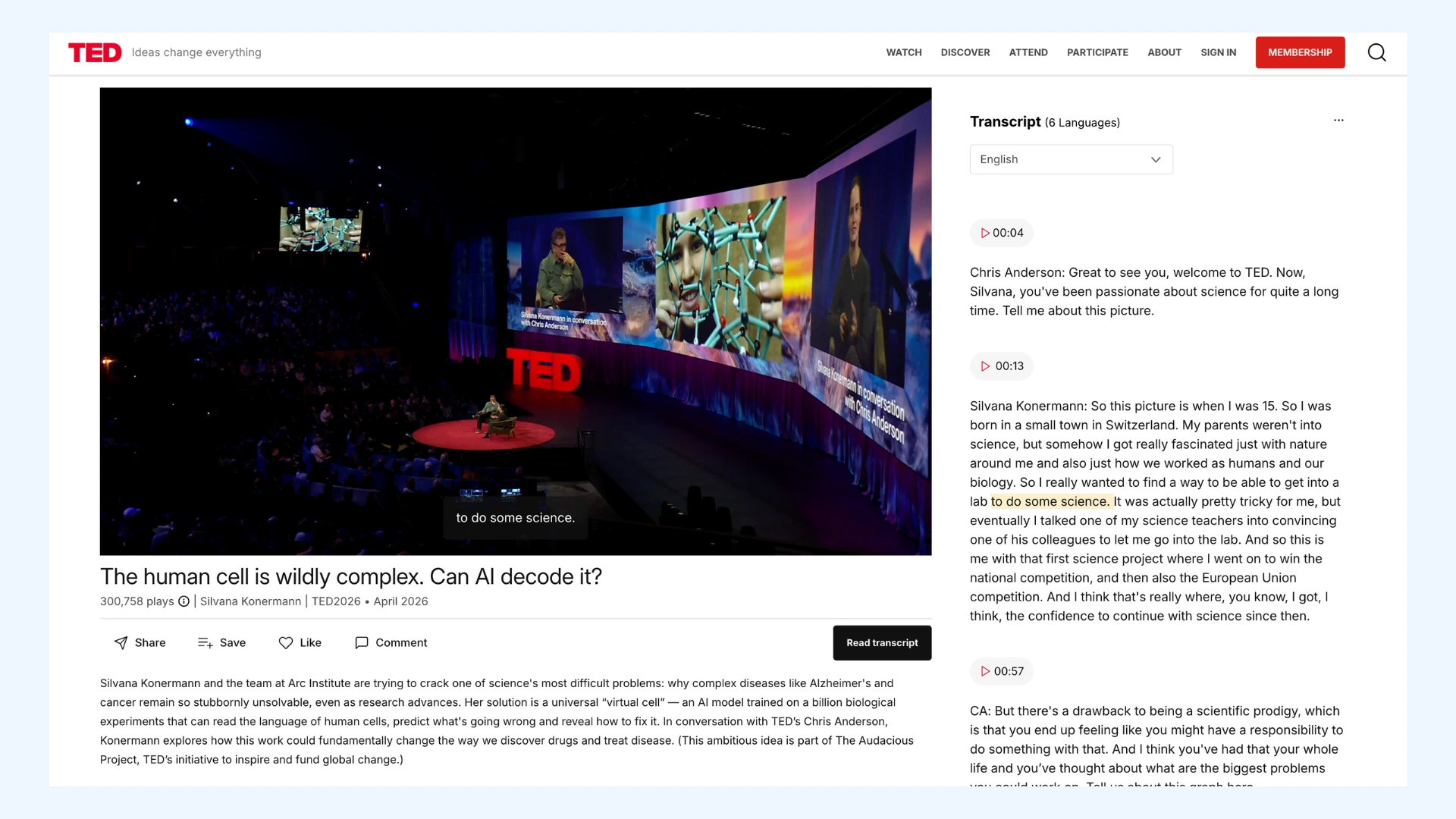
I used a 17-minute TED conversation between Silvana Konermann and Chris Anderson, "The human cell is wildly complex. Can AI decode it?" I picked it for a few reasons:
- It has a published transcript from TED, so I had a reliable source to check every tool against.
- It's packed with dense scientific vocabulary (CRISPR, RNA, single-cell sequencing, Alzheimer's), exactly the kind of content that separates a strong transcription tool from a mediocre one.
- It's a two-speaker conversation, so I could also test how well each tool tells speakers apart.
How I Ran Each Test
- I used the free tier or free trial for every tool except Maestra.
- I noted whether I pasted a video link or uploaded the file directly, since a few tools handled these differently.
How I Scored Accuracy
- I compared every transcript against the official TED transcript.
- I counted a repeated mistake once, since a name misheard three different ways is one underlying weakness, not three separate errors.
- I also noted the total number of times each error appeared, since a mistake that repeats throughout a transcript is a different problem than one that happens once.
Side-by-Side Comparison of Top Academic Transcription Services
Here's how each tool performed, side by side. A few notes on how to read the table:
Errors column shows how many real mistakes each tool made compared to the official TED transcript, not counting a repeated mistake more than once. Where relevant, the total number of times that mistake actually appeared is noted in parentheses.
Key Names and Terms column shows a score like 7/8. That means out of 8 important names and terms in this clip (the speaker's name, her organization, and a few science terms), the tool got 7 right. A lower score means more trouble with names or technical words.
I also checked a few other things for each tool: how well it tells the two speakers apart, how clean the punctuation is, whether it includes timestamps, what file formats you can export, and what you actually get for free.
| Tool | Errors | Key Names and Terms | Speaker Identification | Punctuation & Timestamps | Export Formats | Free Tier |
| Maestra | 2 (3 total) | 7/8: "Silvana" correct once at the open, then "Sivona" both times later on; Arc correct both times | Strong (clean split throughout), unusually granular, even single-word turns are timestamped | Verbatim (captures filler and false starts); very granular timestamps | TXT, DOCX, PDF, JSON | Free trial transcribes a portion of your file |
| Rev | 8 (11 total) | 6/8: missed "Silvana" (heard as "Savannah") and "Arc" (heard as "AHRQ") | Strong (clean split throughout) | Clean, with timestamps on every turn | TXT, DOCX, PDF | 45 min/month, English only |
| Otter | 5 (6 total) | 7/8: "Silvana" heard 3 different wrong ways ("Servani," then "Savannah" x2) | Strong (clean split throughout) | Good punctuation; timestamps only at speaker changes | TXT, DOCX (Pro), PDF (Pro), SRT (Pro) | 300 min/month live; imports capped at 30 min/file, 3 lifetime |
| Sonix | 6 (7 total) | 7/8: drops "Silvana" entirely early on, then substitutes "Savannah" late | Strong (clean split throughout) | Light edit needed; timestamps at every paragraph | DOCX, TXT, PDF, SRT, WebVTT, TTML, CSV, Nvivo, Premiere/FCPX/Avid | 30 min one-time trial |
| TurboScribe | 4 (6 total) | 7/8: "Silvana" heard 2 different wrong ways ("Sivana," then "Savannah" x2) | Strong (clean split throughout), though Speaker 1/2 labels reversed from other tools | Clean; timestamps present, togglable in export | PDF, DOCX, TXT, SRT | 3 transcripts/day, 30 min/file |
| Temi | 2 (4 total) | 6/8: "Silvana" heard as "Savannah" both times; "Arc" heard as "AHRQ" both times | Strong (clean split throughout) | Verbatim (captures all filler); one-click cleanup available | PDF, DOCX, TXT | 45 min one-time trial, then $0.25/min |
| MacWhisper | 9 (11 total) | 7/8: "Savanna" once, "Vana" once; includes one meaning-reversing error ("weren't" heard as "were") | None (both speakers labeled "Unknown" despite selecting a model with speaker recognition) | Fluent but not fully accurate; timestamps present per paragraph | Copy only in the free version; TXT/DOCX/PDF/SRT/VTT require Pro | Free forever; exports and AI features require €64 one-time Pro |
| Trint | Not comparable (only 5 of 17 min available on free trial) | Partial (5 min only): missed "Silvana" (heard as "Savonna"); CRISPR, RNA, single-cell sequencing, Alzheimer's correct in the portion available | Strong in available portion | Clean in available portion | TXT, DOCX, CSV, SRT, VTT, and more | 5-min transcript cap regardless of file length |
| InstantTranscriber | 2 (3 total) | 7/8: "Silvana" heard as "Sivana" throughout, used as the actual speaker label, then flips to "Savannah" once at the very end | Strong (accurate throughout), though one speaker is labeled generically ("SPEAKER_00") and the other by the misheard name | Clean, moderate filler retained; timestamps as start–end ranges per turn | TXT, DOCX, PDF, SRT, VTT | 3 transcriptions/day, 35 min/file cap |
| Descript | 1 (1 total) | 7/8: best name result of any tool: "Silvana" correct 3 of 4 times, wrong once ("Sivona"); Arc correct both times | Mostly clean, though labeling is inconsistent, not every turn explicitly tagged | Verbatim (captures all filler and stutters); auto-generated section headers throughout | HTML, MD, DOCX, TXT, RTF | Free plan available, 60 media minutes/month |
One thing to note: Trint's free trial only shows the first 5 minutes of a transcript, no matter how long your file is. So its result is marked "partial," as it wasn't tested under the same conditions as the other tools.
1. Maestra: Best for Everyday Academic Research Transcription
A note before this section: Maestra is a tool I use regularly for my own work, so this isn't a first-time free-trial test the way the rest of this list is. I'm drawing on both this specific transcript and ongoing daily use.
Verdict: Highly accurate on technical vocabulary and genuinely easy to use day to day, with a solid set of AI features built right in. However, it's not built for deep, granular editing control.
Accuracy
Maestra correctly captured CRISPR, RNA, single-cell sequencing, microglia, Alzheimer's, virtual cell, and Arc Institute. It got the speaker's name right once at the very start, then missed it both times it came up again later, hearing it as "Sivona." Beyond the name, the transcript stayed extremely close to the source.
Turnaround Time
Processing took two to three minutes, on the faster end of the tools tested in this roundup.
Interface
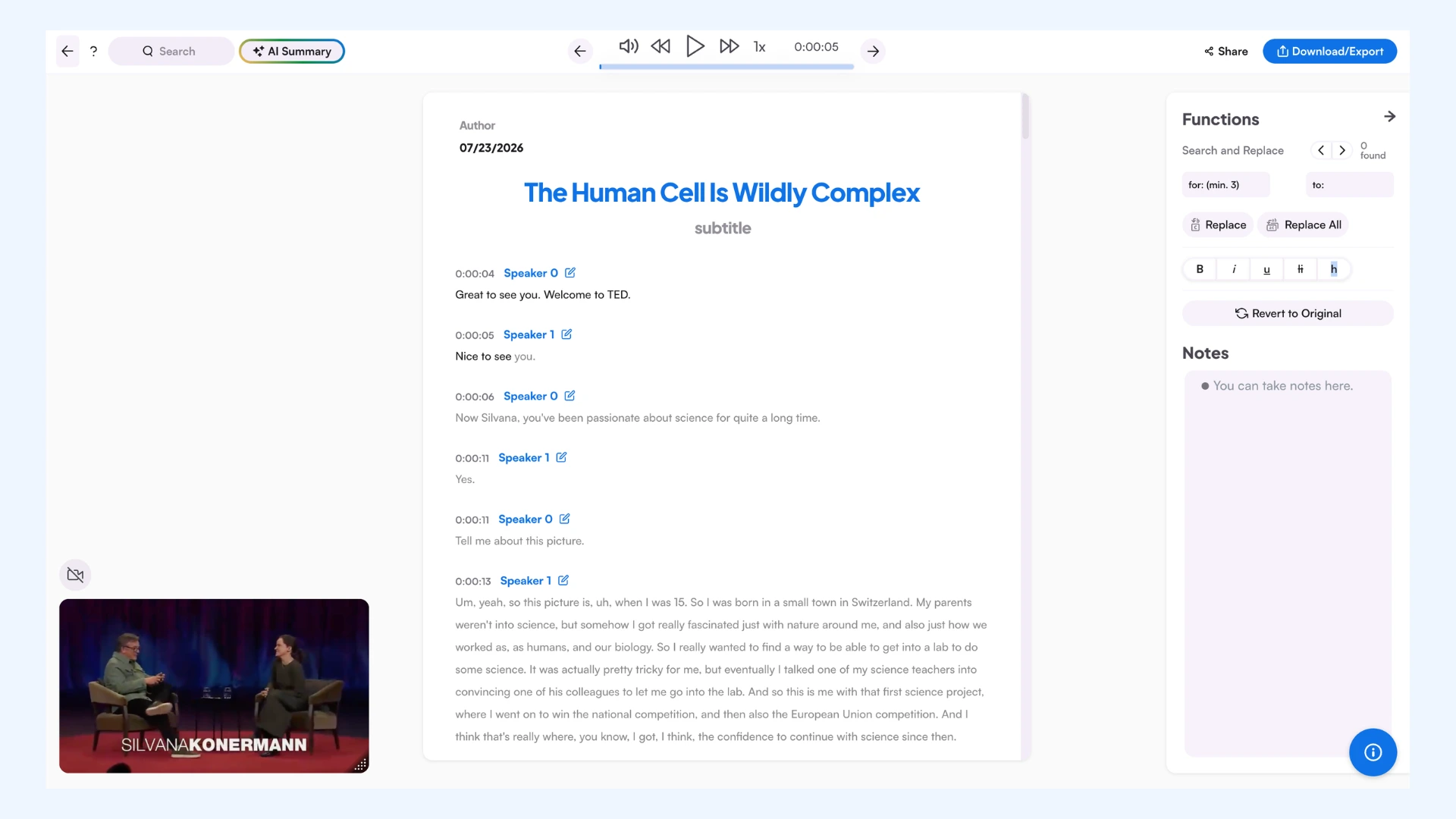
The interface is user-friendly, and skimming or editing a transcript is genuinely easy. If you're looking for a lot of advanced, granular editing controls, though, this isn't the deepest editor on the market. It's built more for speed and usability than complexity.
AI Features
Maestra includes customizable AI summaries, per-speaker briefs that highlight what each speaker said, chapter-based content splitting, and extraction of key themes and topics. All can be utilized for reviewing long lectures or interviews without reading the full transcript start to finish.
Beyond these, Maestra also offers a set of tools built specifically to improve accuracy. A custom Transcription Dictionary lets you add names, jargon, or brand terms the model should always recognize correctly. There's also a Translation Glossary for controlling exactly how specific words get translated, and a Context tool where you can add background information, like the domain or topic of a recording, to help the model further.
For this test, I didn't pre-load "Silvana" or "Arc" into the dictionary, which is likely part of why the name still slipped through. In real use, adding a speaker's name ahead of time would probably fix exactly the kind of error every tool in this roundup ran into.
Pros
- Strong accuracy on technical and scientific vocabulary
- Easy to skim and edit, even for a first-time user
- Built-in AI features cover summaries, per-speaker briefs, chapters, and key themes
Cons
- Free trial transcribes only a portion of your file
- Not built for deep, granular editing control
- Extra accuracy tools (dictionary, glossary, context) require setup ahead of time
- Pay As You Go: $12 per 60 credits (60 minutes of transcription), no subscription
- Lite: $23/month billed annually or $29 billed monthly, 180 min/month
- Basic: $39/month billed annually or $49 billed monthly, 360 min/month, adds AI summary, custom dictionary, and cloud file sharing
- Premium: $79/month billed annually or $99 billed monthly, 900 min/month, adds team collaboration, API access, and priority support
- Enterprise: Custom pricing, adds live event captioning and custom development
🌟 Maestra offers a 20% discount for students, teachers, and non-profit organizations.
Transcribe Academic Materials in 125+ Languages
2. Rev: Best for AI-Powered Academic Transcript Analysis
Verdict: Excellent AI analysis and strong technical terminology recognition, but double-check researcher names and institutions before citing transcripts.
Rev is a well-known transcription service, offering both human and AI-based options, and it's built to serve everyone from students to academic professionals.
Accuracy
In my testing, Rev handled running speech and technical terminology well. It correctly captured dense scientific terms including CRISPR, RNA, single-cell sequencing, and microglia.
The weak spot was proper nouns. Rev heard the speaker name "Silvana" as "Savannah" and the organization "Arc Institute" as "AHRQ." For anyone citing a source or quoting a researcher by name, that is the costliest kind of error.
Turnaround Time
Rev processed and produced the transcript in about three to four minutes, not the fastest turnaround in this roundup, but not a hassle either.
Interface
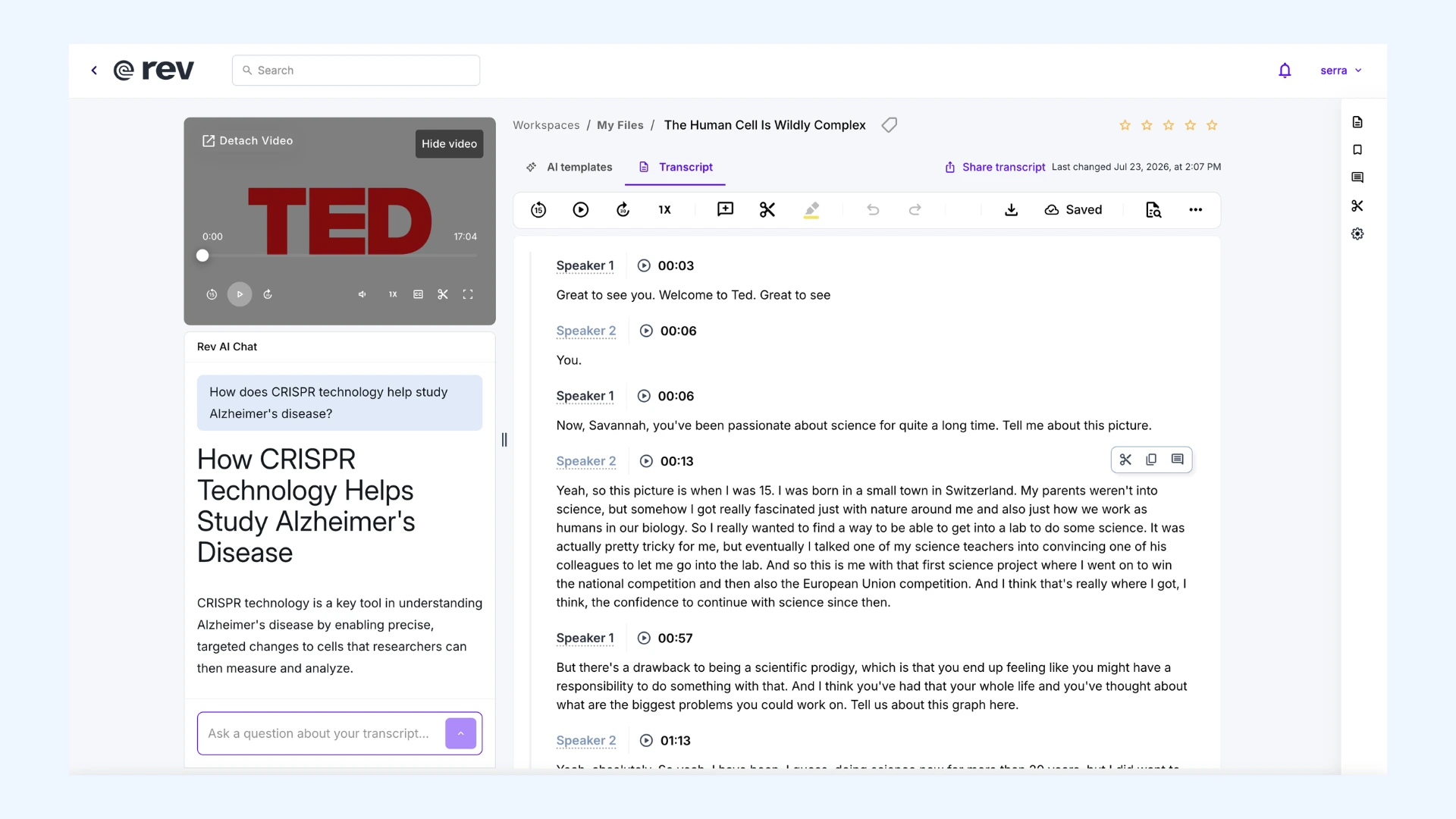
The interface is clean and easy to navigate. Rev suggests clips from the most important parts of the conversation, which can be especially useful if you are working through a long lecture or interview and need to find the key moments fast.
AI Features
This is the part that impressed me most. Rev includes an AI chat that answered my questions about the transcript clearly, even the more complex technical concepts in it. So instead of rereading the full transcript, I could ask what a section covered and get a straight answer.
The AI templates go further. There is a wide range, from short summaries to in-depth analysis, and they adapt to the type of audio. When I asked for a follow-up email, Rev told me it could not create one because this was an interview, not a meeting. That small touch showed the templates are reading the context, not just filling in a form.
Pros
- Clean, easy to navigate interface
- Extracts the most important moments for you
- Handles technical jargon well
Cons
- Struggles with names and proper nouns
- Slower to process than some of the other tools in this roundup
- Free tier limited to 45 minutes a month
- Free: 45 AI transcription minutes/month, English only
- Essentials: $25.49/seat/month (billed yearly) or $29.99 (billed monthly), 5,000 minutes/month, English and Spanish
- Pro: $47.99/seat/month (billed yearly) or $59.99 (billed monthly), 10,000 minutes/month, 37+ languages
- Unlimited: Custom pricing, unlimited minutes, built for large teams
Top 12 Rev Alternatives for AI Transcription (Free & Paid)
3. Otter: Best for Lecture Recaps and Quick Study Notes
Verdict: Fast and easy to use, with handy AI summaries, but less consistent on names than Rev and not as sharp at reading context.
Otter is a widely used AI transcription and meeting notes tool, popular for turning meetings and lectures into quick, searchable notes.
Accuracy
Otter handled the scientific vocabulary well, correctly capturing CRISPR, RNA, single-cell sequencing, and microglia. Where it struggled was the speaker's own name. Otter heard "Silvana" as "Servani" once and "Savannah" twice, three different wrong versions within the same transcript.
Turnaround Time
Otter shows an estimated processing time before it starts. For this video, it estimated three minutes and finished even faster than that.
Interface
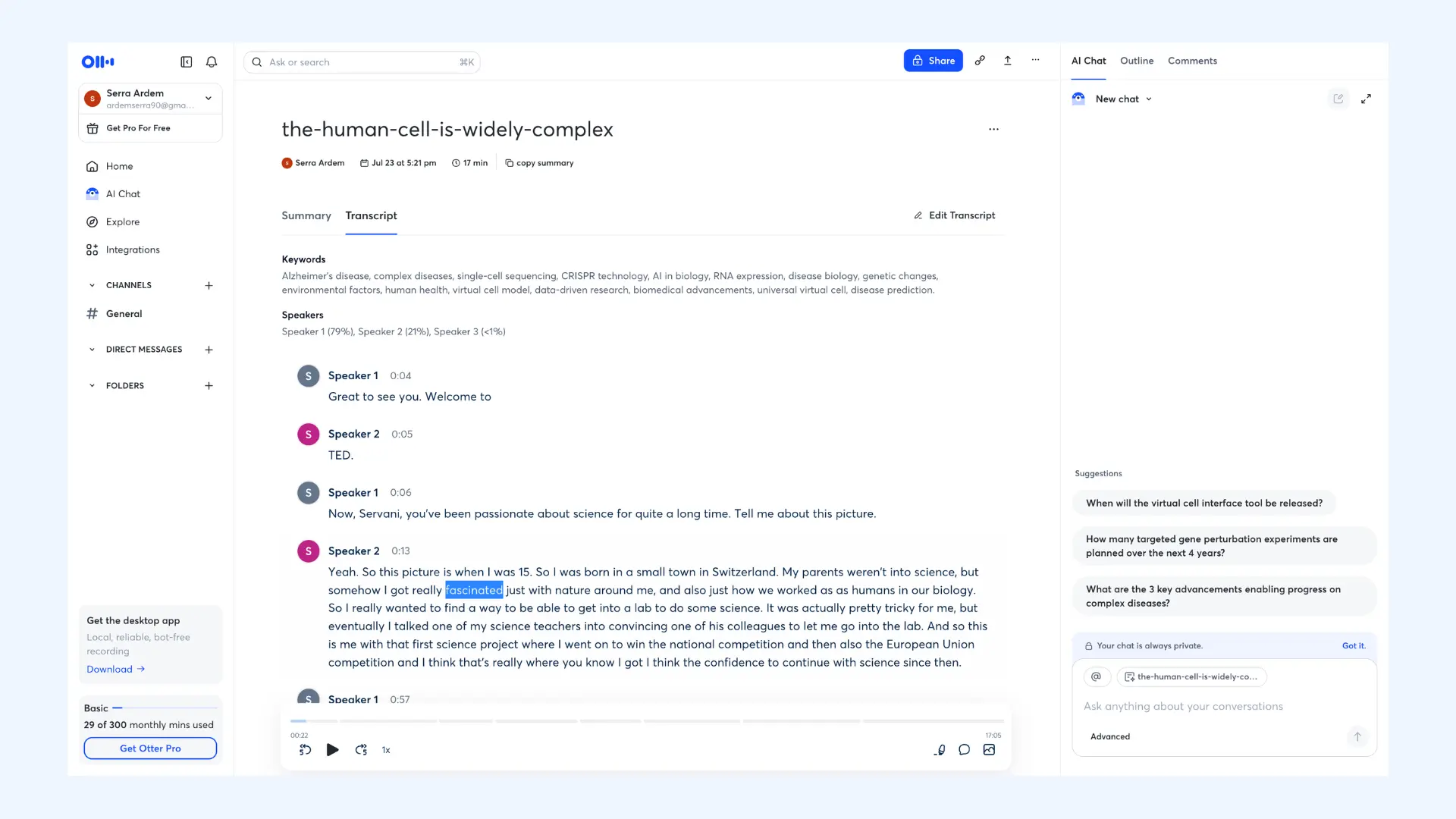
The interface is modern and clean. One difference from Rev: Otter doesn't let you watch the original video alongside the transcript. You can only playback the audio.
AI Features
In addition to the transcript, Otter generates a compact summary and an outline with clear subheadings, so you can skim the structure of a long recording without reading it start to finish. It also includes an AI chat for asking questions directly about the transcript.
One gap showed up here, though. Rev recognized this was an interview and declined to draft a follow-up email because of it. Otter didn't make that distinction. It generated a list of action items as if the recording were a meeting, even though nothing in it called for follow-up tasks.
Pros
- Fast processing (often quicker than its own estimate)
- Built-in AI summary, outline, and chat
- Simple to pick up with no learning curve
Cons
- Inconsistent on names
- Doesn't adjust to audio type (generated meeting-style action items for an interview)
- No video playback alongside the transcript (audio only)
- Basic (Free): 300 min/month for live recordings; imported files capped at 30 min each, 3 lifetime imports
- Pro: $16.99/user/month (billed monthly) or $8.33/user/month (billed yearly), 1,200 minutes/month, 10 file imports/month
- Business: $30/user/month (billed monthly) or $19.99/user/month (billed yearly), unlimited meeting minutes, 6,000 imported-file minutes/user
- Enterprise: Custom pricing, unlimited everything
4. Sonix: Best for Detailed Research Exports
Verdict: Strong technical accuracy and unusually flexible export options, but the transcript itself needs a cleanup pass, and the free tier leaves branding in your downloaded transcript.
Sonix is an AI transcription tool aimed at researchers and teams that need more control over how a transcript is exported and formatted.
Accuracy
Sonix correctly captured CRISPR, RNA, single-cell sequencing, microglia, Alzheimer's, and virtual cell. It struggled with the speaker's name: rather than substituting a wrong name, it dropped "Silvana" entirely for most of the transcript, then introduced "Savannah" near the end.
Turnaround Time
Sonix doesn't accept a pasted video link on the free plan. That's a Pro feature, so I downloaded the video and uploaded it directly. Processing took three to four minutes. Not the fastest of the tools I've tested, but not a struggle either.
Interface
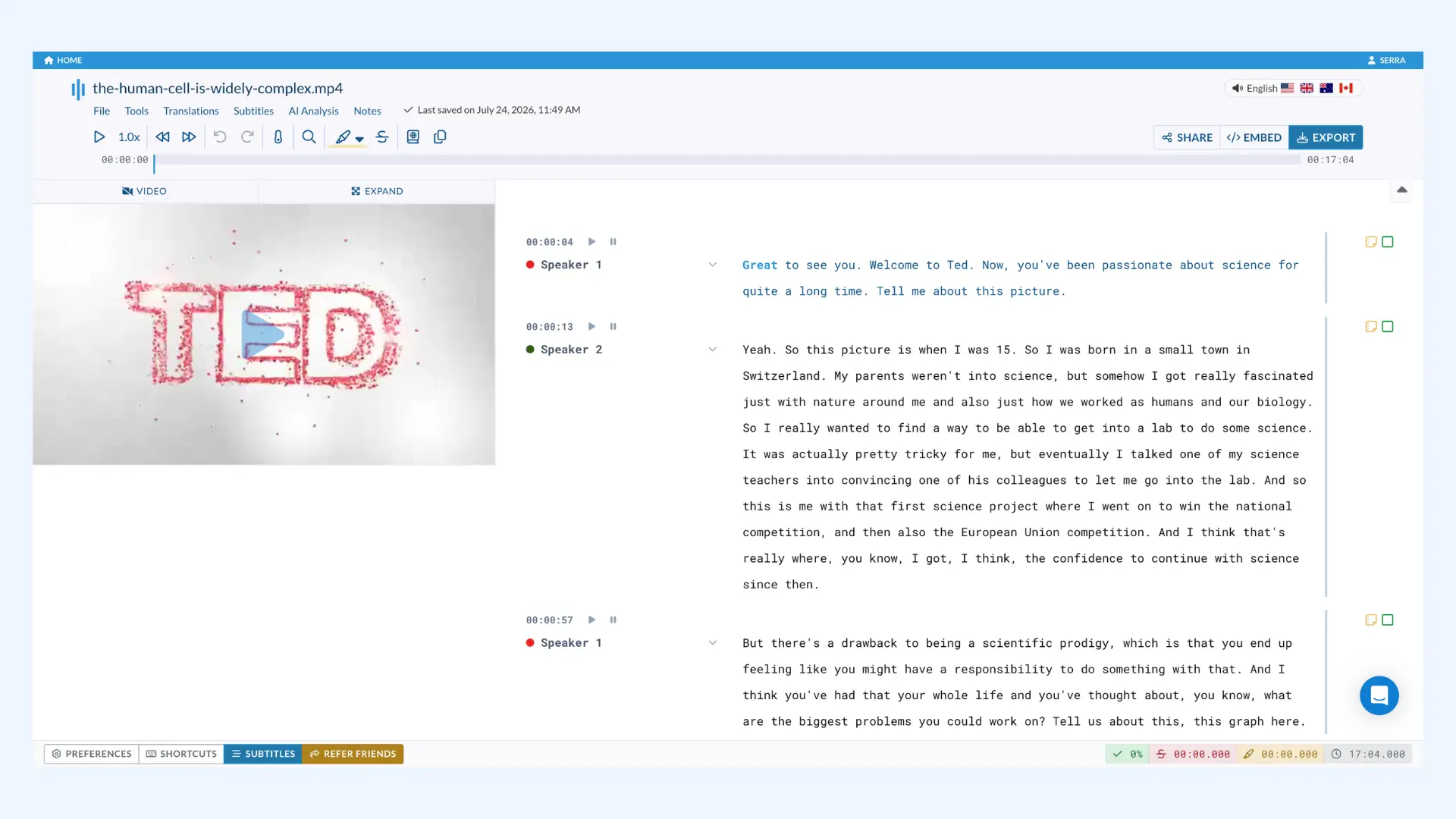
The interface feels a little old-school, but it's easy to navigate. Like Rev, Sonix lets you watch the original video alongside the transcript rather than audio only.
Export Formats
This is where Sonix stands out. It offers an unusually wide range of export formats, including some built specifically for research use, plus flexible time coding and formatting options you can adjust before exporting.
AI Features
There's no AI chat, but Sonix has a custom prompt section where you can ask questions about the transcript directly, and the answers were clear and easy to read. It also generates concise AI summaries, in either paragraph or bullet form, which were genuinely useful. Sonix advertises other AI features, chapter generation and sentiment analysis among them, but the free trial limits meant I couldn't test those myself.
One extra detail worth noting: Sonix can display confidence colors directly in the transcript, flagging words it's less sure about. In my test, though, it didn't flag the missed or dropped name, so the feature's real-world usefulness for catching this kind of error is unclear.
Pros
- Wide range of export formats (including research-specific options)
- Clear, useful AI summaries and a custom prompt feature for questions
- Confidence indicators built into the transcript
Cons
- Some filler words carried over (worth a quick pass before use)
- No pasted-URL option under the free trial
- Free export carries unremovable Sonix branding
- Free trial: 30 minutes total, one-time
- Pay As You Go: $10/hour, no subscription, single user
- Core: $25/mo ($275/yr), includes 5 hrs/mo transcription, 5 hrs/mo AI workspace, 25 GB storage
- Advanced: $50/mo ($550/yr), includes 20 hrs/mo transcription, 25 hrs/mo AI workspace, 50 GB storage
- Pro: $80/mo ($880/yr), includes 40 hrs/mo transcription, 100 hrs/mo AI workspace, 100 GB storage
- Enterprise: Custom pricing, 1 TB storage, unlimited team members

7 Best Sonix.ai Alternatives for Automated Transcriptions
5. TurboScribe: Best for Free Daily Academic Transcriptions
Verdict: Clean, accurate, and one of the most polished raw transcripts, with a generous 3 free transcriptions a day. However, its AI features live in a separate ChatGPT integration rather than built in.
TurboScribe is an AI transcription tool built on OpenAI's Whisper, offering a choice of transcription models depending on your priority.
Accuracy
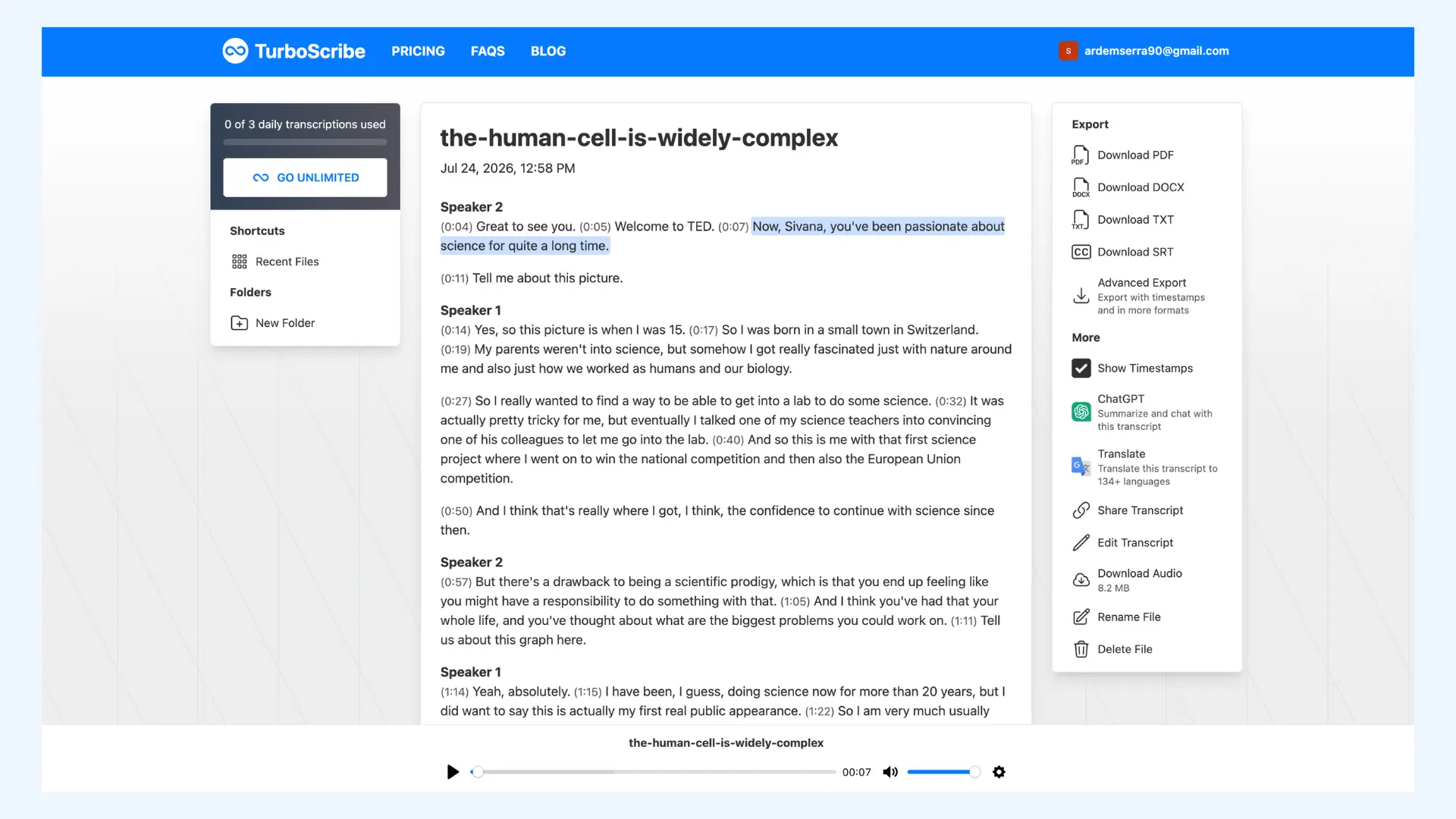
TurboScribe correctly captured CRISPR, RNA, single-cell sequencing, microglia, Alzheimer's, virtual cell, and Arc Institute. Like the other tools, it struggled with the speaker's name, hearing "Silvana" as "Sivana" once, then "Savannah" twice later on. Punctuation and sentence structure were clean, with natural paragraph breaks and only moderate filler retained.
Turnaround Time & Transcription Models
TurboScribe offers a choice of three transcription models: Cheetah for speed, Dolphin for a balance of speed and accuracy, and Whale for the highest accuracy. I used Whale for this test. Processing took three to four minutes.
Interface
The interface is simple with no clutter. One gap: there's no video player, only audio playback, so you can't watch the original file alongside the transcript.
Audio Enhancement
For lecture or interview audio that isn't studio-clean, TurboScribe offers an option to remove background noise and enhance speech before transcribing.
AI Features
TurboScribe doesn't have a built-in AI chat like Rev or Otter. Instead, it routes you to a dedicated ChatGPT integration for summarizing or asking questions about the transcript. There are also options to convert the transcript directly into a blog post or social media post draft, a nice touch if you need to repurpose the content elsewhere.
The tradeoff is convenience. Copying prompts over to ChatGPT takes an extra step compared to tools with the AI built directly into the transcript view.
Pros
- Natural-reading transcript with clean punctuation
- Choice of transcription models to balance speed vs. accuracy
- Generous free tier at 3 transcriptions a day
Cons
- No video playback (audio only)
- AI features require a separate ChatGPT step rather than being built in
- No URL pasting (files must be uploaded directly)
- Free: 3 transcripts a day, 30-minute file limit, 1 file at a time
- Unlimited: $10/month billed yearly or $20/month billed monthly, 10-hour/5GB file uploads, up to 50 files at once
- Teams: $120/user/year billed yearly, unlimited transcriptions for multiple users, access management to add or remove users anytime, and simplified billing with all users on one subscription
6. Temi: Best for Verbatim Transcripts on a Budget
Verdict: Simple, accurate, and the most literal transcript of the tools tested. You can clean up filler with one click, but there are no AI features.
Temi is a pay-as-you-go transcription tool owned by Rev, built as a simpler alternative to Rev's own subscription product.
Accuracy
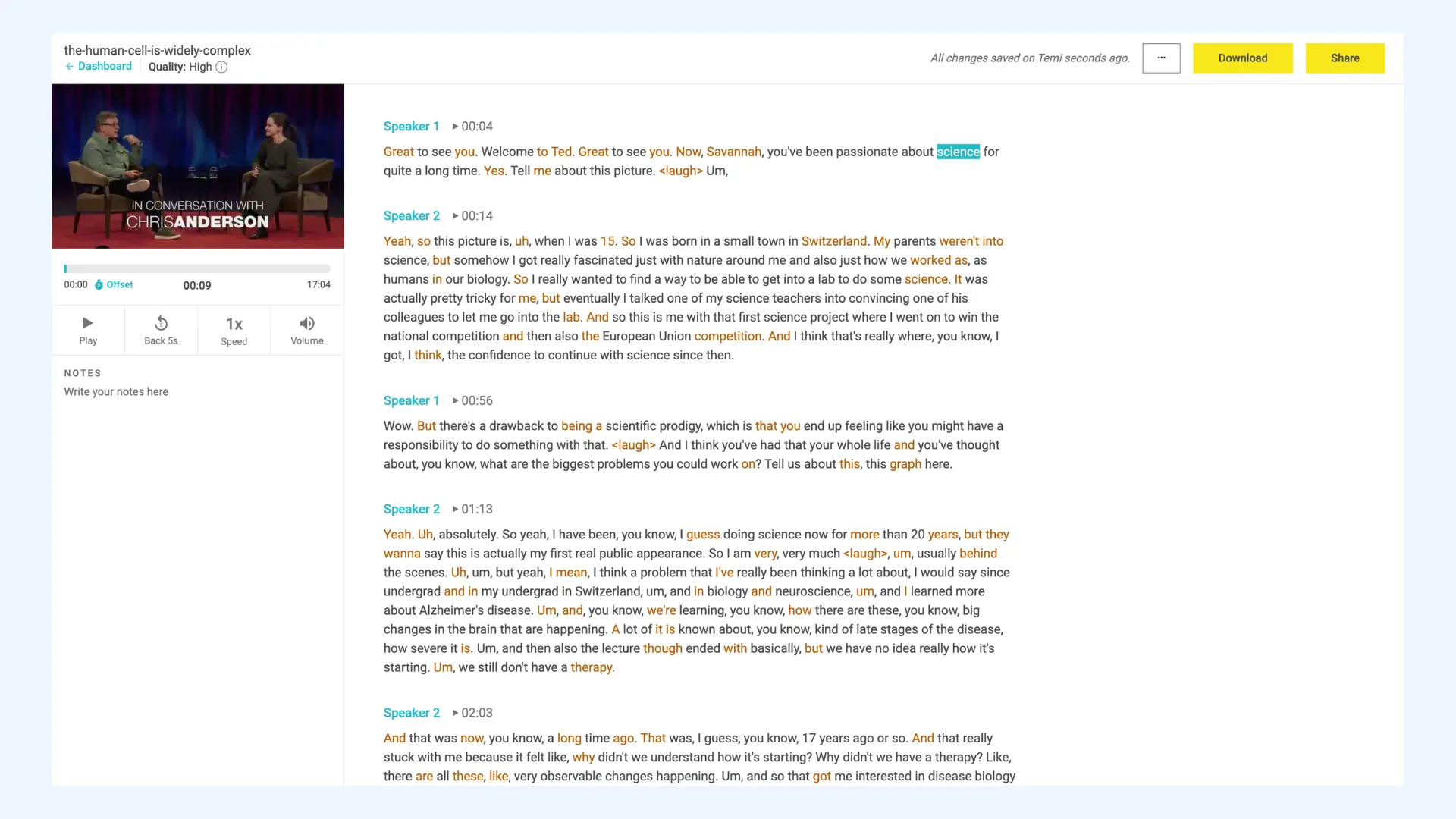
Temi correctly captured CRISPR, RNA, single-cell sequencing, microglia, Alzheimer's, and virtual cell. It struggled with the same two proper nouns as several other tools: the speaker's name came through as "Savannah" both times it was said, and "Arc Institute" as "AHRQ" both times, consistently wrong rather than varying.
Turnaround Time
The first time you use Temi, before creating an account, the flow is a little different. You upload the file, then Temi emails you when the transcript is ready, and you access it by logging into the editor. Once you have an account, you can paste a video link directly like with the other tools.
Interface
The interface is simple and distraction-free. It includes a video player alongside the transcript, not just audio.
Transcription Style & Confidence Indicators
Temi is the most literal transcript I tested. It captures filler words, false starts, and reaction sounds in full, rather than smoothing them out. That makes it useful if you need an exact record of what was said, but it also means the raw transcript reads less like clean prose. Luckily, a single button removes filler words from the transcript, so you can toggle between the literal version and a cleaner read.
Additionally, Temi highlights low-confidence phrases in different colors, similar to Sonix. In my test, these were mostly filler words rather than substantive errors.
AI Features
Temi has none. No chat, no templates, no summaries. It's a much simpler tool than Rev, its own parent company's product.
Pros
- Simple, distraction-free interface
- One-click filler word removal
- Color-coded confidence levels show which words to double-check
Cons
- No AI features at all
- No editing history or version control if you want to compare edits
- Verbatim style needs a cleanup pass if you want a polished transcript
- First file free: up to 45 minutes
- Pay-as-you-go: $0.25/audio minute after that, no subscription or minimum balance
7. MacWhisper: Best for Private, Offline Academic Transcription
Verdict: Processes audio locally on your Mac instead of uploading it anywhere, but it made one error that flipped the meaning of a sentence. Most useful features are locked behind Pro.
MacWhisper is a Mac app that transcribes locally, using a choice of speech recognition models, so your audio never has to leave your computer.
Setup
Downloading the app took three to four minutes, and choosing and downloading a speech recognition model took another three to four. There's a choice between local models (WhisperKit, Apple, Parakeet, and language-specific options) and cloud models like Deepgram and ElevenLabs, which need an API key. I used the recommended local WhisperKit Small model.
Accuracy
MacWhisper correctly captured CRISPR, RNA, single-cell sequencing, microglia, Alzheimer's, virtual cell, and Arc Institute. It struggled with the speaker's name, hearing it as "Savanna" once and "Vana" once, a third different wrong version compared to what other tools produced.
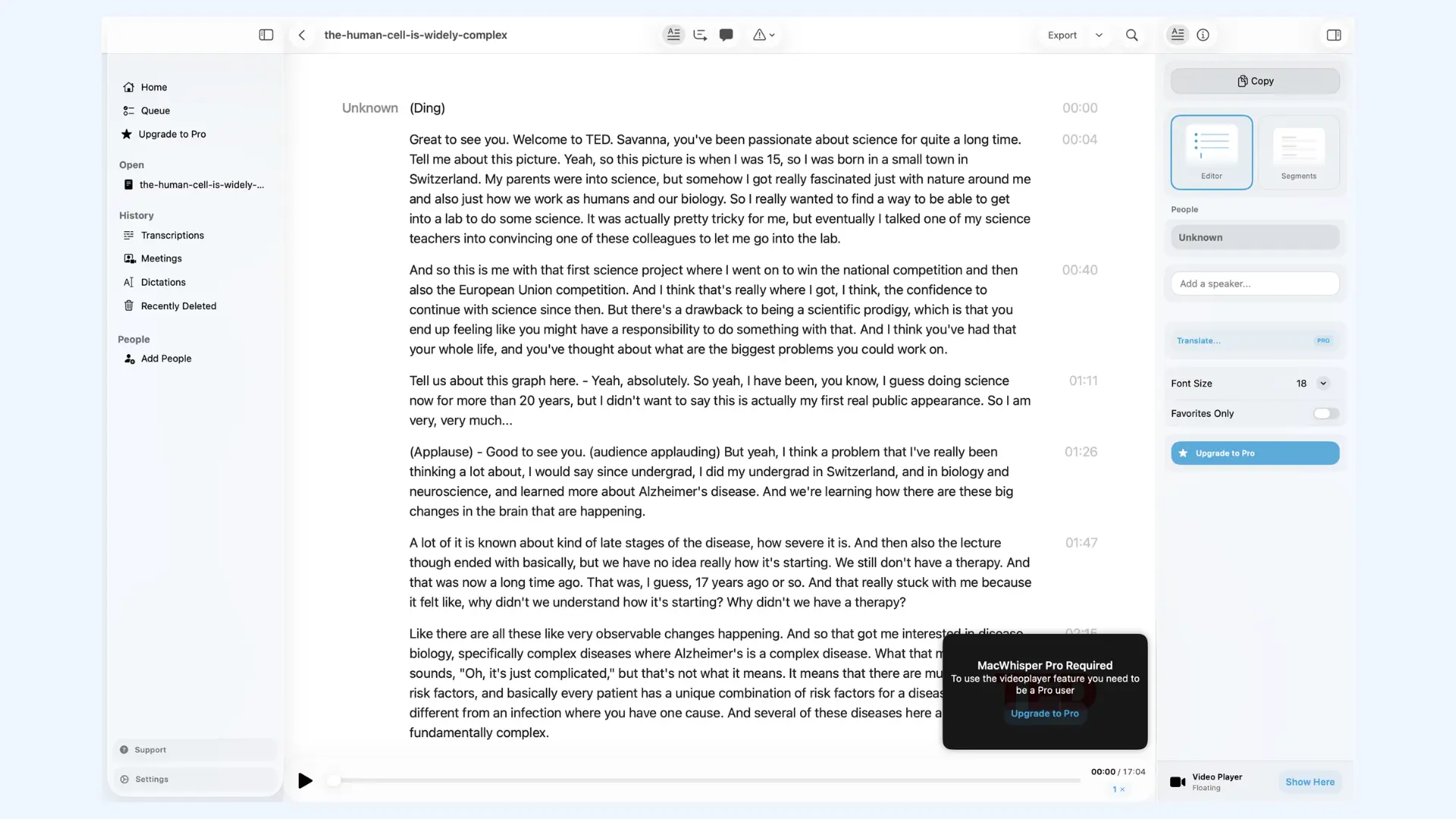
The more significant error was a reversed statement. The source says "My parents weren't into science." MacWhisper dropped the word "weren't" and transcribed the opposite: "My parents were into science." This is the kind of mistake spellcheck won't catch and a quick skim can miss, since the sentence still reads perfectly naturally, it just says the wrong thing.
Speaker Identification
Even though I selected a model with speaker recognition, it wasn't applied. Both speakers are labeled "Unknown" rather than being told apart, so you'd need to infer who's talking from context. You can add speaker names manually, but it's not automatic.
AI Features
MacWhisper offers more than a basic summary and chat. It can turn a transcript into a mind map, or clean up punctuation and grammar with a single click. Unfortunately, all of this (including the AI summary, AI chat, and ready-made prompts like pulling out statistics or bullet points) needs Pro.
Free vs. Pro
Beyond the AI features, most of the practical output is locked too. On the free plan, you can only copy the transcript text. Exporting to TXT, DOCX, or any other format requires Pro. Several input options, like recording Zoom or Teams meetings directly and generating live captions, also require Pro.
Pros
- Runs fully offline (audio never leaves your device)
- Choice of transcription models, including local and cloud options
- Transcript can be broken into sentence segments for easier scanning and editing
Cons
- No automatic speaker identification (even with a model that supports it)
- Setup (downloading the app plus a speech model) takes a while
- Most useful features (export, AI summary, AI chat) require Pro
- Free: Free forever, includes basic transcription, local/cloud model choice, and copy-only output
- Pro: €64, one-time payment, includes lifetime updates, unlocks exports (TXT, DOCX, PDF, HTML, MD, SRT/VTT), automatic speaker recognition, AI features, batch transcription, meeting recording, and more
🌟 Unlike every other tool in this roundup, MacWhisper Pro is a single one-time purchase rather than a monthly or yearly subscription, worth weighing differently against Rev's or Sonix's recurring plans if you're comparing long-term cost. MacWhisper also offers a student discount, worth checking if you qualify.
8. Trint: Best for Professional-Grade Highlights and Summaries
Verdict: Polished, professional features and an attractive interface, but the free trial only lets you see five minutes of your transcript.
Trint is an AI transcription tool aimed at newsrooms and professional teams, with an emphasis on turning a transcript into usable highlights and summaries.
Accuracy
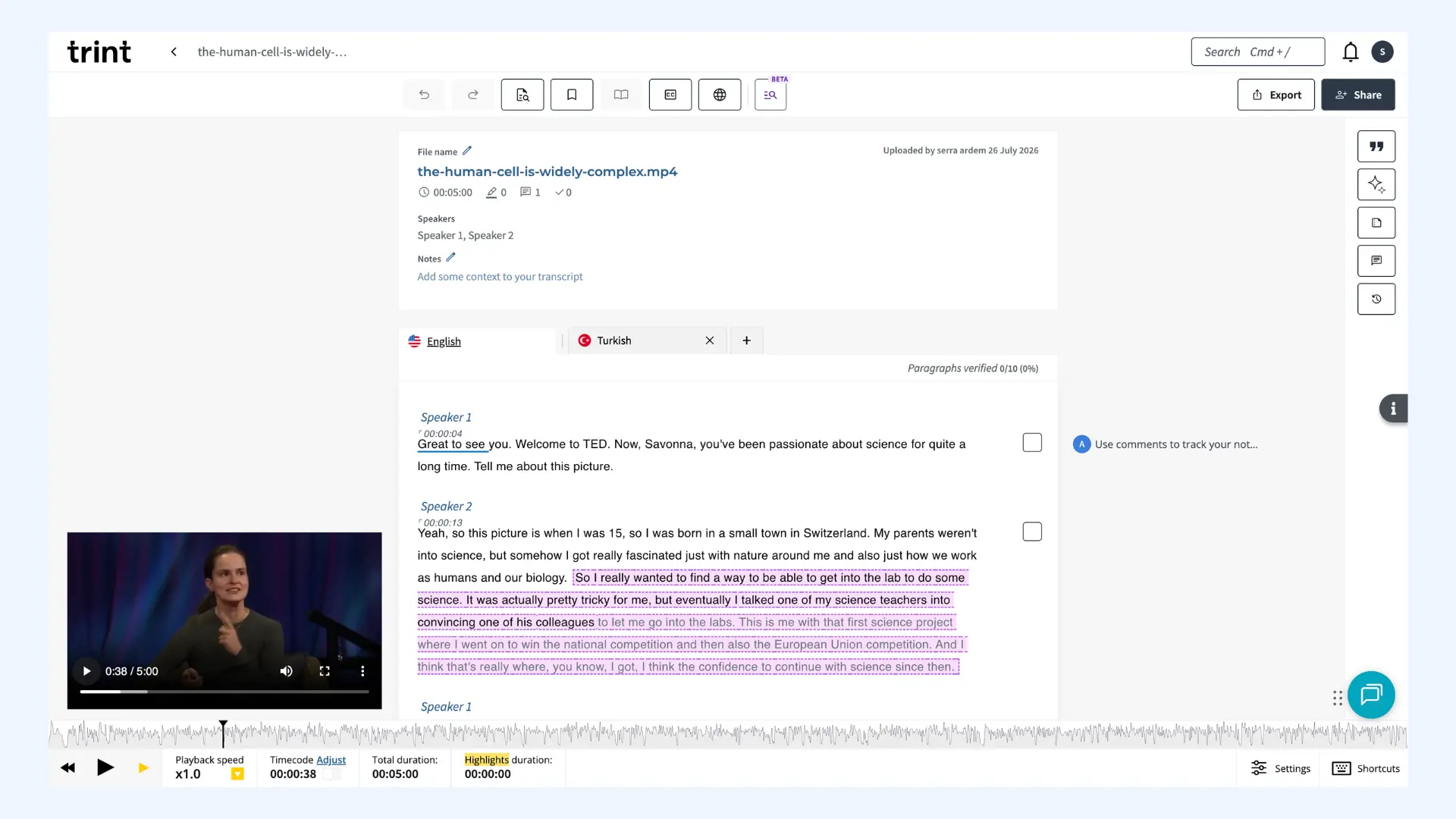
I could only evaluate the first five minutes of the transcript due to the free trial limit, so this isn't a full read on Trint's accuracy the way I could give for the other tools. In the portion I could see, Trint handled the scientific vocabulary well, correctly capturing CRISPR, single-cell sequencing, RNA, and Alzheimer's. However, it missed the speaker's name, hearing "Silvana" as "Savonna."
Turnaround Time
Pasting a video link returned an error, so I uploaded the file directly. Processing took four to five minutes.
Free Trial Limit
This is Trint's biggest drawback for testing. The free trial only unlocks the first five minutes of a transcript, regardless of how long the source file is. For a 17-minute talk, that's a small fraction of the total.
Interface
The interface is beautiful and includes a video player alongside the transcript.
AI Features
Trint's AI features are genuinely strong. One click surfaces suggested highlights, key quotes, insights, and summaries, and there's an AI chat for asking questions directly. Summaries come in paragraph or bullet form, and you can adjust how detailed they are. You can also translate the transcript into another language with a single click, which worked smoothly when I tried it.
Pros
- Strong AI highlights, summaries, and chat
- Easy one-click translation
- Option to export just the highlights
Cons
- Free trial caps at five minutes of transcript regardless of file length
- Can't fully evaluate accuracy on a real recording without paying
- URL pasting returned an error (so you may need to upload files directly)
- Free trial: 7 days, 3 files maximum, only the first 5 minutes of each file transcribed, no card required
- Pro (individuals): $100/seat billed monthly, or $79/seat/month billed annually, unlimited transcriptions in 50+ languages, unlimited translations in 70+ languages, AI summaries, one-click video subtitles, 1 hour of live transcription a month
- Team (2–5 members): $90/seat billed monthly, or $69/seat/month billed annually, everything in Pro, plus Shared Drives and real-time collaborative editing with up to 5 team members
- Business (teams of all sizes): Custom pricing, everything in Team, plus advanced live transcription, automatic language detection, enhanced security (ISO 27001, EU-based servers), and unlimited global collaboration
Top 9 Trint Alternatives for AI-powered Transcriptions
9. InstantTranscriber: Best for Quick, Accurate Transcripts on a Budget
Verdict: One of the most accurate transcripts tested, but the free tier carries an unremovable watermark and its speaker labels are a bit unusual.
InstantTranscriber is a browser-based AI transcription tool that supports file uploads, pasted links, and direct audio recording.
Accuracy
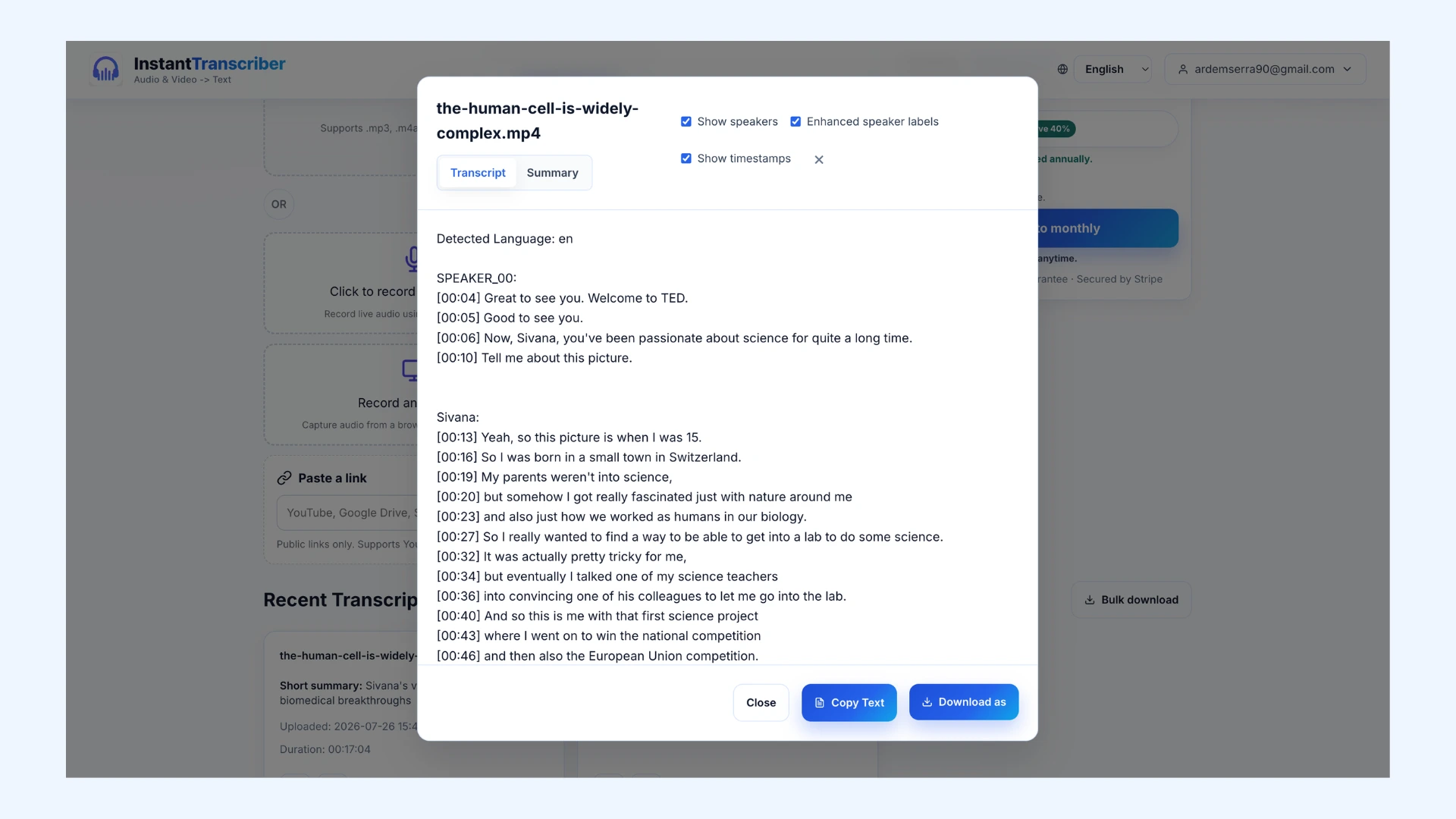
InstantTranscriber correctly captured CRISPR, RNA, single-cell sequencing, microglia, Alzheimer's, virtual cell, and Arc Institute. It missed the speaker's name throughout, hearing it as "Sivana" consistently, which became the actual speaker label used across the whole transcript, then it briefly flipped to "Savannah" in the very last line. Beyond the name, the transcript stayed close to the source, with only one small addition that wasn't actually said.
Turnaround Time
Pasting the video link gave a very fast turnaround, but the result only included timestamps, no speaker labels or summary. Uploading the file directly took longer, but returned a more detailed transcript with speaker identification and a short summary included.
Interface
The interface is simple and easy to use. Beyond uploading a file or pasting a link, you can also record audio directly or capture audio from a browser tab. One important limitation: there's no built-in editor, so you can't correct anything directly in the transcript, like the name mishearing above. You'd need to copy or export the text to fix errors.
Speaker Labels
Speaker separation was accurate throughout, correctly telling the two speakers apart. The labeling itself is a little unusual, though: one speaker is tagged generically ("SPEAKER_00"), while the other is labeled by the misheard name rather than a neutral "Speaker 1" or "Speaker 2."
AI Features
InstantTranscriber included a short AI-generated summary automatically when I uploaded a file directly, though not when I pasted a link. It's a lighter AI layer than tools like Rev or Trint, no chat, no custom prompts, but the summary was accurate and easy to skim.
Pros
- Strong accuracy (among the clearest transcripts tested)
- Flexible input options
- Includes speaker identification and a short summary on the free tier
Cons
- Speaker labels are inconsistent
- Free export carries an unremovable branding line
- Pasting a link skipped speaker labels and the summary entirely
- Free: $0, no card required, 3 transcriptions a day, 35-minute file limit, 50 MB max, first transcript includes a summary
- Pro: $5.99/month billed annually or $9.99 billed monthly, unlimited transcriptions, parallel jobs, 10-hour/3GB file limit, higher-quality speaker labels, transcript summaries, priority support
- Enterprise: Custom pricing, everything in Pro, plus team management, a dedicated account manager, custom integrations, and 24/7 priority support
10. Descript: Best for Turning Interviews into Ready-to-Publish Content
Verdict: Delivers precise transcripts, and is a genuinely different tool than a simple transcriber. It is more of a full audio/video editor, which is a strength if you need more than a transcript.
Descript is primarily a video and podcast editing tool, with transcription as one entry point into a much larger set of AI writing and editing features.
Accuracy
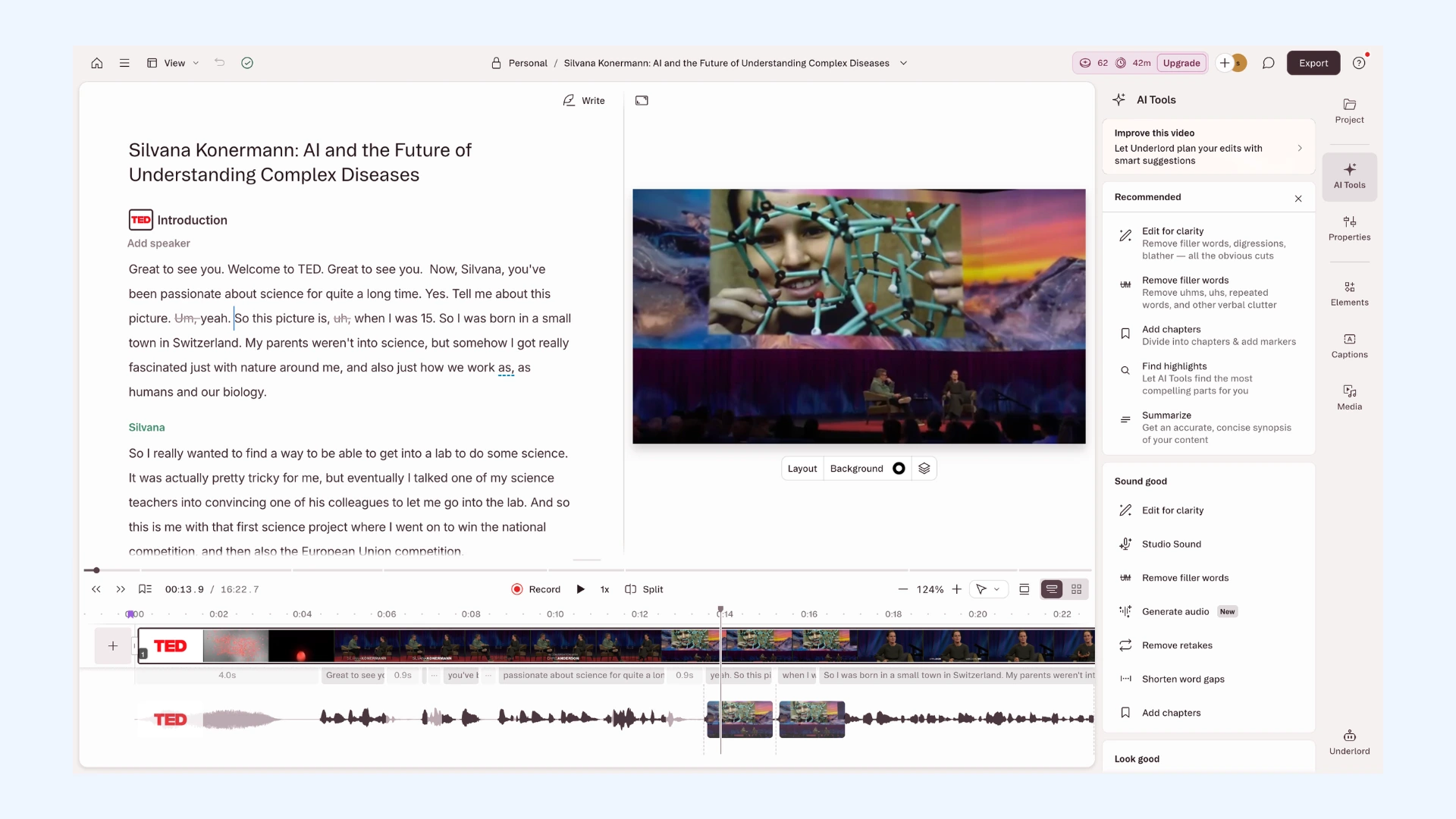
Descript got the speaker's name right three out of four times it was said, correctly transcribing "Silvana" at the opening, mid-interview, and in the closing line, and only misheard it once, as "Sivona," near the end. Arc Institute came through correctly both times. CRISPR, RNA, single-cell sequencing, microglia, Alzheimer's, and virtual cell were all correct as well.
Turnaround Time
The upload process is different from every other tool tested. You upload the file, then enter a prompt describing what you want Descript to do with it. There are prompt templates to choose from, I used the one built for transcription. Processing took a little while.
Transcript Style
Descript writes down every "um," "uh," and stutter, but a one-click filler word removal tool cleans that up automatically. It also adds section headers like "Introduction" and "The Problem: Complex Diseases" on its own, giving the transcript a clear structure without any extra work.
AI Features
Beyond filler removal and section headers, Descript includes automatic chapter markers, a tool for finding and highlighting key moments in the conversation, and summary generation. The summary it produced was genuinely solid. There's also a feature to shorten pauses or dead air in the conversation.
The feature I liked best: Descript can write a description and show notes for a podcast or YouTube video straight from the transcript. That's a nice shortcut if you're a researcher trying to turn your work into something shareable.
Pros
- Very strong accuracy (especially on the speaker's name)
- Auto-generated chapters, summaries, and highlights
- Can turn a transcript directly into show notes, an outline, or a script
Cons
- More complex than you need if you just want a plain transcript
- Processing took a little longer to complete
- Verbatim style needs a cleanup pass unless you use the filler-removal tool
- Free: $0, 60 media minutes/month, 100 one-time AI credits, 720p watermark-free export, no card required
- Hobbyist: $24/month billed monthly, or $16/month billed annually, 10 media hours/month, 400 AI credits/month, 1080p watermark-free export, access to Underlord AI co-editor and core AI tools (Studio Sound, Remove Filler Words, Create Clips)
- Creator (most popular): $35/month billed monthly, or $24/month billed annually, 30 media hours/month, 800 AI credits/month, 4K export, full access to 20+ AI tools, AI video generation
- Business: $65/month billed monthly, or $50/month billed annually, 40 media hours/month, 1,500 AI credits/month, team-wide Brand Studio, translation/dubbing in 30+ languages, priority support
- Enterprise: Custom pricing, SOC 2 Type II, SSO/SCIM, custom AI/media limits, dedicated support
Final Verdict: Which Academic Transcription Service Should You Use?
After testing all ten tools on the same recording, a few things became clear about what actually matters for academic transcription.
- No single tool was the best at everything. The right choice depends on whether you prioritize transcription accuracy, AI-powered analysis, export flexibility, or verbatim transcripts.
- Proper nouns were consistently the biggest challenge. Researcher names and institution names were far more likely to be misheard than scientific terminology.
- Technical terms were generally recognized more accurately than names. Terms like CRISPR, RNA, and microglia were transcribed correctly more often than researcher names or organizations.
- Strong AI features often compensated for weaker transcripts. The best AI assistants generated useful summaries, answered questions accurately, and understood the context of the recording, reducing the amount of manual review needed.
- Researchers should always verify names, institutions, and citations. Regardless of the tool, a final review is still essential before quoting, publishing, or citing an AI-generated transcript.
If you want to try one of these academic transcription services yourself, here's how I'd narrow it down:
For general academic use, Maestra, Rev, and Descript each combine strong accuracy with genuinely useful AI features, a good fit for educational institutions and independent researchers alike.
If budget is the main concern, TurboScribe, Temi, and InstantTranscriber all offer a solid free tier with few strings attached.
If privacy is a priority, especially for research interviews involving sensitive data, MacWhisper is the only transcription service here that processes audio entirely on your device.
If you need more than a transcript, like show notes, chapters, or a script, Descript goes furthest beyond basic transcription.
No academic transcription tool tested here was perfect, and that's the honest takeaway: run your own recording through whichever transcription service you pick, and check the parts that matter most, names, quotes, and anything you plan to cite, before trusting the output as final.
FAQs on Best Academic Transcription Services
What are the best academic transcription services for researchers?
Based on hands-on testing, Rev, Sonix, TurboScribe, Temi, MacWhisper, Trint, InstantTranscriber, Descript, and Maestra all handle academic transcription well, though each has different strengths. Some are stronger on technical terminology, others on export formats or research-specific formatting. The right pick depends on whether you're transcribing research interviews, focus groups, or classroom recordings.
How accurate are AI transcription tools for academic research interviews?
Accuracy varies by tool, but most modern services handle common academic terminology and technical vocabulary well. Where they tend to struggle is with proper nouns, like a researcher's name or an institution. It's worth double-checking names and specialized terms in any transcript before relying on it for research notes or citations.
Can these tools handle multiple speakers in focus group discussions?
Most of the tools tested here identify multiple speakers reasonably well, correctly separating turns in a two-person conversation. Group discussions with more speakers or overlapping talk are harder for any transcription process to get right. If the tool allows, set the number of speakers during upload, which can improve how accurately they separate voices in a larger group.
What does academic transcription cost, and are there free options?
Pricing for education transcription services ranges widely, from completely free tools with daily or monthly limits, to pay-per-minute pricing, to monthly subscriptions aimed at teams. Several tools in this roundup offer a genuinely usable free tier, which is worth trying before committing to a paid plan.
Are verbatim transcripts available for qualitative research?
Yes. Some tools default to a verbatim style, capturing filler words, false starts, and pauses exactly as spoken, which is useful for qualitative research where the exact phrasing matters. Others clean up the transcript automatically, which is better suited to lecture notes or content you plan to publish or share.
Can I use these tools to transcribe lectures and classroom recordings?
Yes, several of the tools tested here work well for classroom recordings and lecture transcription, especially ones with a single, clear speaker. Longer lectures may hit a free-tier time limit, so check each tool's file-length cap before uploading a full class session.
Should I use human transcription or AI for sensitive research data?
For sensitive research data, tools that process audio locally on your device, rather than uploading it to a server, offer stronger privacy since the recording never leaves your computer. If your research involves participant confidentiality or IRB requirements, that's worth weighing alongside accuracy and cost when choosing a service.