
Get Started Free

Microsoft Teams Live Translation

Automatically translate Teams meetings in real-time to break language barriers and generate insightful transcripts.


Include everyone in the conversation with live translation!

Start real-time transcription and translation

Try Live Translation Now

Trusted by teams and individuals at:

HP
Walmart
Bayer
Meta
NHS
Dell
Deloitte
HP
Walmart
Bayer
Meta
NHS
Dell
Deloitte

How to Live Translate Microsoft Teams Meetings

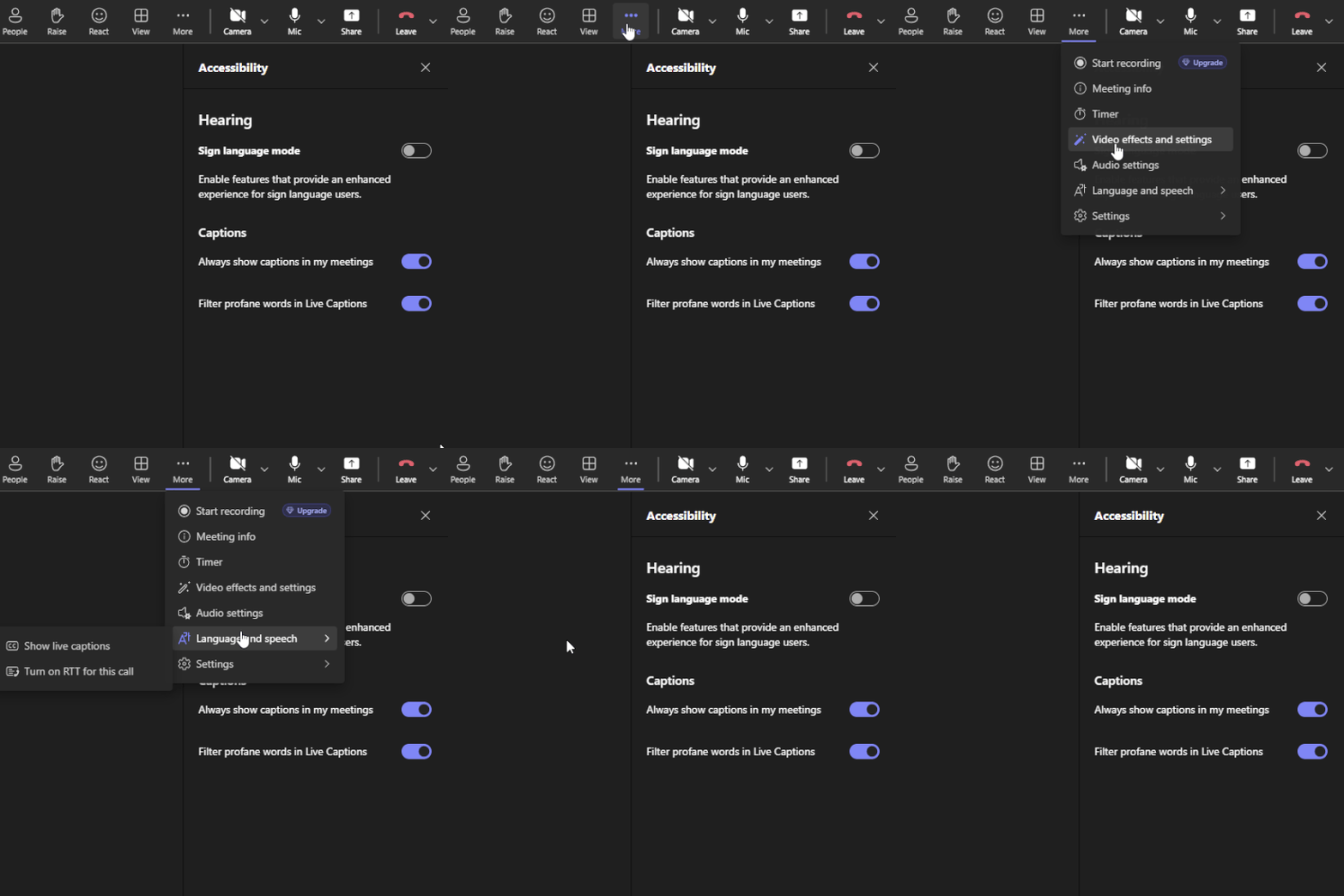
Enable live captions in a Teams meeting
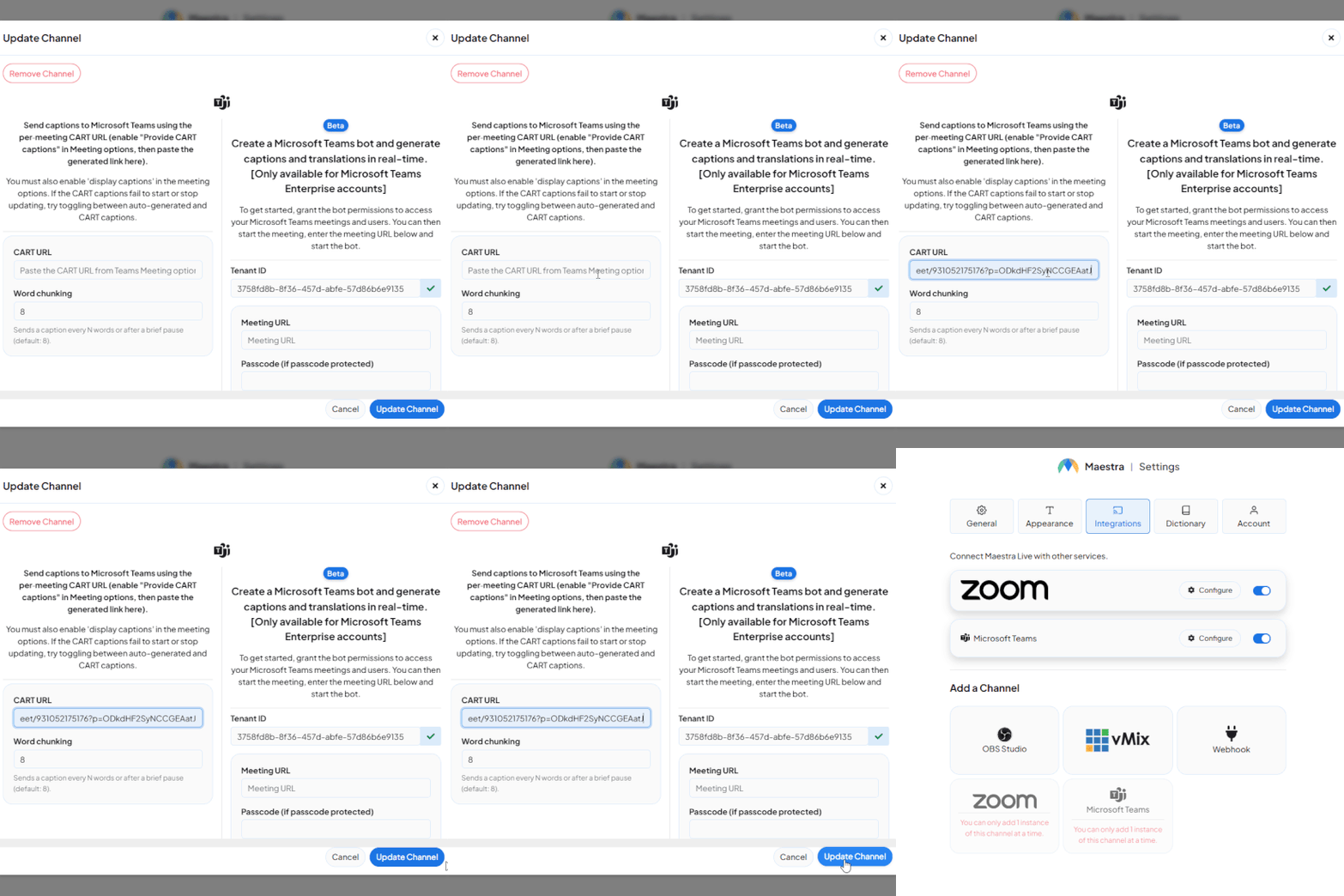
Add the CART url in the integration tab
Display live captions in real-time

AI-Powered Microsoft Teams Translation

Translate your Microsoft Teams meetings in real time with live captions, dubbing, and full transcripts.

Live Translated Captions

Display real-time translated captions during your Teams meetings so every participant can follow along in their own language.

Live Dubbing and Voice Cloning

Go beyond captions with real-time voice dubbing. Translate your speech using realistic AI voices or clone your own voice in another language.

Save Meeting Transcripts and Translations

Export your Teams meeting transcripts and translations to share with your team, archive for compliance, or repurpose into other content.

Customer Reviews

g2

4.8 out of 5 stars

Read all reviews

"Master the Media with Maestra"

The best side of this product is auto subtitling. And most importantly, it supports multiple languages.

Read full review

"The All In One "over the top" turnkey solution for Automatic Transcripts, Subtitles and Voiceovers"

What comes to mind as Maestra being the go-to solution for our company is that it's such a time and money saver.

Read full review

"perfect for anything transcript needs"

The best thing about Maestra is how well it creates transcripts. It's so useful for me. It makes my day a lot easier.

Read full review

"MAESTRA IS THE GO-TO FOR SUBTITLING. LOVE IT!"

Maestra is just amazing! We were able to produce subtitles in multiple languages assisted by their platform. Multiple users were able to work and collaborate thanks to their super user-friendly interface.

Read full review

"Pocket Friendly Content Creator"

It is cloud-based. It allows to automatically transcribe, caption, and voiceover video and audio files to hundreds of languages. It helps to reach and educate people all around the globe.

Read full review

FAQ

What languages does Maestra support for Teams translation?

Maestra supports over 125 languages for live translation, covering all major business languages and regional variants. You can translate captions and audio in real time during any Teams meeting.

Can I save the translated transcript after my Teams meeting?

Yes. Maestra automatically generates a full transcript and translation of your meeting that you can export, share with your team, or archive for future reference.

Can I translate a Teams meeting into multiple languages at once?

Yes. You can translate into multiple languages simultaneously, so every participant follows along in their preferred language.

How accurate is live translation for Microsoft Teams meetings?

The Microsoft Teams meeting translation is powered by AI trained on real conversational data, delivering high accuracy even with fast speech, accents, and technical terminology.

Can I translate a recorded Teams meeting after it ends?

Yes. You can upload meeting recordings and get translated transcripts, subtitles, or dubbed audio in any supported language.

Does the translator work with screen sharing and presentations?

Yes. The translated captions run alongside your meeting view, so participants can follow presentations and translations at the same time.

Can I use the translator for Teams webinars and large events?

Yes. The translator supports meetings, webinars, and large-scale events with real-time captions and dubbing for multilingual audiences.

Does the translation work on mobile Teams meetings?

Yes. Live translated captions and dubbing work across desktop and mobile, so participants can join from any device.

