Top 6 Italian Translator Apps: A Straightforward Review (2026)
Italian translator apps look similar on the surface, but they behave very differently in real use.
We wanted to see which ones actually work in real situations, so we spent time using popular Italian translator apps for things people genuinely need them for: short conversations, travel phrases, reading menus and signs, and everyday Italian–English translation. This includes apps often mentioned as the best Italian English translator options, as well as a few that proved less reliable in practice.
We used these apps across multiple real-world scenarios rather than relying on demos or feature lists.






How We Used These Italian Translator Apps
We didn’t run scripted tests or compare spec sheets. Instead, we used these apps in everyday situations where Italian–English translation actually matters.
That included:
- Short Italian–English phrases and everyday sentences
- Voice conversations, focusing on speed and clarity
- Menus, signs, and labels, where context is important
- Offline use, especially while traveling
Some apps handled casual use well but struggled with voice input. Others were accurate but slower or less intuitive.
As expected, accuracy varied depending on audio quality, pronunciation, and sentence complexity.
Comparison Table: Italian Translator Apps
| App | Text Translation | Voice | Offline | Camera | Best Use Case |
| Google Translate | Yes | Yes | Yes | Yes | Everyday use & travel |
| DeepL | Yes | Limited | Yes | No | Accurate Italian–English text |
| Maestra | No | Yes | No | No | Live translation, subtitles, dubbing |
| Microsoft Translator | Yes | Yes | Yes | Yes | Spoken conversations |
| iTranslate Voice | Limited | Yes | Yes | No | Quick mobile voice use |
| Linguee | Yes | No | Yes | No | Context & learning |
Top 6 Italian Translator Tools Reviewed
Below are in-depth reviews for the best 6 Italian translator apps, saying what they are good at, what they are okay at, and which one should be used in which case.
1. Google Translate
Google Translate is often the first app people turn to for Italian–English translation, mainly because it’s free, widely available, and easy to use. For quick lookups or short phrases, it’s usually enough to get the job done.
In real use, it works well for basic Italian–English translation, especially when you’re traveling or need something translated quickly. Voice input is fast, camera translation helps with menus and signs, and offline language packs are useful when you don’t have reliable internet access.
Where Google Translate starts to show limits is in nuance and longer conversations. Italian idioms, sentence structure, and tone don’t always carry over cleanly, and voice conversations can feel a bit rigid compared to more conversation-focused apps.
Overall, it’s a solid everyday option and one of the most practical tools for casual use. For many people, it’s still the default — but it’s not always the best choice when accuracy or natural phrasing matters most.
Best for:
Quick Italian–English translation while traveling, especially for menus, signs, and short conversations.
Pros
- Free and easy to access
- Strong voice and camera translation
- Offline language support
Cons
- Less accurate with nuance and idioms
- Not ideal for longer conversations
2. DeepL
DeepL is best known for translation quality, especially between European languages like Italian and English. It focuses more on accuracy than speed or extra features.
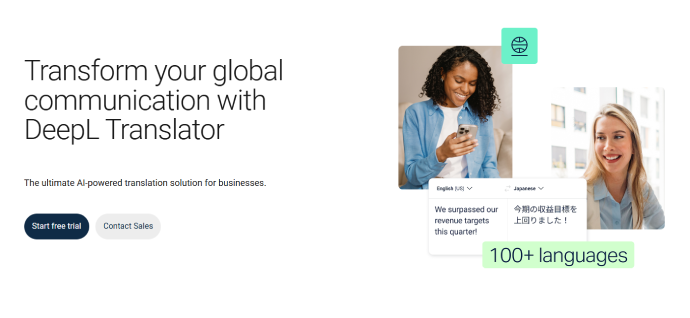
In practice, DeepL performs very well for written Italian–English translation. Sentence structure and phrasing often feel more natural compared to many other apps, which makes it a strong choice for emails, documents, or study.
However, DeepL is less suited for live or spoken translation. Voice features are limited, and it’s not built for conversations or real-time use.
Best for:
Users who care most about accurate, natural-sounding Italian–English text rather than live conversation.
Pros
- High-quality, natural translations
- Strong Italian–English accuracy
Cons
- Limited voice features
- Not designed for live conversation
3. Maestra AI
Maestra is not a traditional Italian translator app for quick phrase lookups. Instead, it’s designed for live and large-scale Italian–English translation, where speech, audio, and video can be translated in real-time or on-demand.
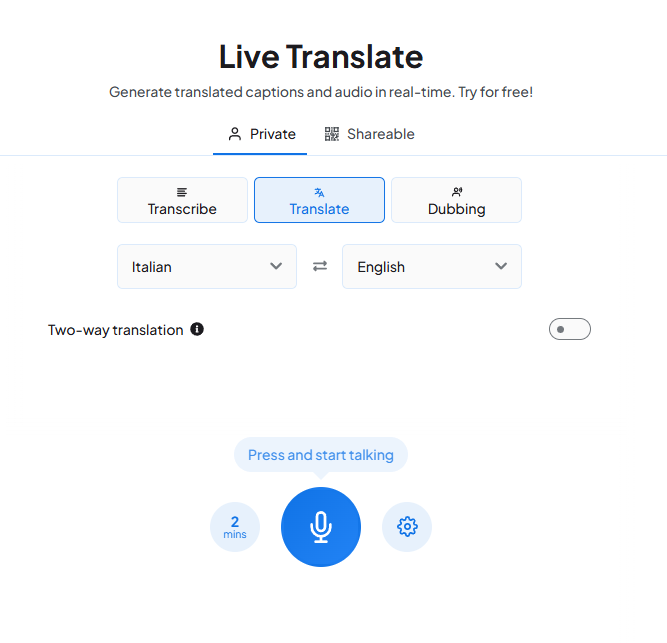
In real use, Maestra stands out for media content & live events. Rather than translating one sentence at a time, it can live translate Italian audio into captions or through live dubbing/voice cloning. Also, you can upload media files in the Italian language and translate them to English or 125 more languages using auto subtitles and AI dubbing.
Features like real-time Italian–English translation, live captions, multilingual sessions, and AI voice dubbing make it a strong option for teams, creators, and organizations working with Italian content regularly.
Best for:
Translating Italian audio and video in real time, including live captions, subtitles, and AI dubbing at scale into English or 125+ languages
Pros
- Strong real-time translation
- Complete translation with subtitles and dubbing
Cons
- Not meant for quick phrase translation
- Need to pay for advanced features
4. Microsoft Translator
Microsoft Translator focuses on live voice translation and conversation mode, making it a solid option for spoken Italian–English use.

In practice, it works well for voice conversations and small group translation. The app supports real-time speech translation and can handle back-and-forth dialogue better than many basic translation apps.
That said, it’s not as strong for nuanced text translation, and the interface can feel more functional than intuitive.
Best for:
Spoken Italian conversations where voice interaction matters more than polished text output.
Pros
- Strong voice translation
- Conversation mode support
Cons
- Less polished for text translation
- Limited advanced features
5. iTranslate Voice
iTranslate Voice is a mobile-first app built specifically for spoken translation. It’s simple, fast, and designed for short Italian–English voice exchanges.
.webp)
In real use, it works best for casual conversations, travel situations, and quick questions. The interface is straightforward, which makes it easy to use on the go.
It’s not built for longer conversations, written translation, or professional use cases, which limits its scope.
Best for:
Fast, on-the-go Italian voice translation on mobile, without extra setup or features.
Pros
- Simple and easy to use
- Good for short voice interactions
Cons
- Limited beyond voice translation
- Not suitable for complex use cases
6. Linguee
Linguee is different from the other tools on this list. It’s not a live translator, but a context-focused dictionary that shows how Italian words and phrases are used in real sentences.
.webp)
In practice, it’s especially useful for learning Italian or understanding nuance. Seeing real examples helps clarify meaning in ways that direct translation sometimes can’t.
However, Linguee doesn’t support voice translation or live conversation, so it works best as a supporting tool rather than a standalone translator.
Best for:
Understanding how Italian words and phrases are actually used in real sentences and contexts.
Pros
- Real-world sentence examples
- Helpful for learning and nuance
Cons
- No voice translation
- Not designed for live use
Quick Picks: Best Italian Translation Software
If you want a fast takeaway, this is the simplest way to narrow things down.
- Everyday Italian–English translation: Google Translate
- Accurate Italian–English text: DeepL
- Live Italian audio, video, and subtitles: Maestra AI
- Spoken Italian conversations: Microsoft Translator
Each of these tools solves a different problem, which is why the right choice depends on how you plan to use it.
FAQ
What is the best Italian English translator app?
It depends on how you plan to use it. For quick everyday translation and travel, Google Translate is often enough. For higher-quality Italian–English text translation, DeepL is usually a better choice, while tools like Maestra make more sense for live translation, subtitles, and spoken content.
Do Italian translator apps work offline?
Some do. Google Translate and iTranslate allow you to download Italian language packs for offline use, which is useful when traveling. Accuracy can drop slightly without an internet connection, especially for voice translation.
Which Italian translator is best for voice conversations?
Microsoft Translator and iTranslate Voice are both strong options for spoken Italian–English conversations. They’re designed specifically for voice input rather than long-form text translation.
Are free Italian translator apps accurate enough?
For basic use, yes. Free apps handle common phrases and short sentences well, but they can struggle with idioms, complex grammar, or longer conversations. Accuracy also depends heavily on clear audio and pronunciation.
Can these apps translate menus and signs?
Most modern Italian translator apps support camera-based translation. Google Translate is particularly useful here, especially for menus, street signs, and labels while traveling.
Is there an Italian translator for live meetings or videos?
Yes, but not all apps are built for that. Platforms like Maestra focus on live Italian–English translation, subtitles, and dubbing, which makes them better suited for meetings, webinars, and video content than mobile translator apps.
Are Italian translator apps good for learning Italian?
They can help, but they’re not a replacement for learning tools. Apps like Linguee are especially useful for understanding context and sentence usage, while translator apps are better for quick reference.
