How to Add Audio Descriptions with AI: Best Practices & Accessibility Standards
- What is an audio description?
- Different Types of Audio Description
- Standards and Requirements of Audio Descriptions
- Why should you add audio descriptions?
- Who needs audio descriptions?
- What to Include in Audio Descriptions
- How to Add Audio Descriptions to Videos with AI
- Best Practices for Adding Audio Descriptions
- Conclusion
- Frequently Asked Questions
Audio description is one of those accessibility features that sounds simple until you actually try to implement it. On paper, it’s just “describe what’s happening on screen.” In reality, you have to decide what matters, how much detail is too much, where the narration should fit, and how to keep it natural without talking over dialogue. If you're working with lots of videos, it can become a real production challenge.
However, as AI continues to evolve, that process is no longer as time-consuming or manual as it used to be. An AI-powered audio description generator can create descriptions quickly and help you improve accessibility across your content without slowing down production. But in my experience, the best results still come from pairing automation with a clear checklist and a quick human review.
In this blog, I’ll break down what audio description is, the different formats you might need, and the standards and legal frameworks shaping requirements across regions. Then I’ll share practical guidance on what to include, what to avoid, and how to add audio descriptions to a video without losing quality in the process.
Let's start with the basics.
What is an audio description?
At its core, an audio description (AD) is an additional narration track designed to make visual media accessible to individuals who are blind or have low vision. Think of it as "alt text for video." While a standard video relies on the viewer seeing the action, an audio description fills in the blanks by verbally describing key visual elements that aren't conveyed through the original dialogue or sound effects.

A Multimodal Bridge to Information
According to the World Health Organization (WHO), at least 2.2 billion people worldwide have a near or distance vision impairment. For this audience, a silent scene in a movie or a complex chart in a corporate presentation can leave out critical context. Audio descriptions close that gap by narrating:
- Physical actions: A character nodding silently, a door being locked, or a subtle exchange of glances.
- Physical appearance: The age, clothing, and distinctive features of people on screen.
- Settings and atmosphere: The sweeping landscape of a desert, the cluttered desk of a professor, or the ominous lighting of a dark hallway.
- On-screen text: Title cards, lower-thirds, labels, charts, or names and titles in a documentary.
In a professionally produced video, these descriptions are strategically placed during natural pauses in dialogue. The goal is to deliver essential visual context without interrupting the original soundtrack, so the viewer can follow the story, instructions, or message as clearly as possible.
In short, when done well, audio description feels like an organic extension of the storytelling rather than an intrusive interruption.
Different Types of Audio Description
Depending on the accessibility needs, audio description can take several different forms. You'll likely choose one of the four primary delivery methods. Each serves a specific purpose, from basic compliance to high-level support.
Live vs. Pre-recorded Audio Description
The most fundamental distinction is timing.
- Pre-recorded AD: This is the standard for films, streaming shows, and social media videos. The description is scripted and synced during post-production.
- Live AD: Critical for sports, live news, and theatrical performances. A trained describer provides real-time narration. Nowadays, many broadcasters and event organizers are also beginning to adopt AI to support live audio description, especially when speed and scale are priorities.
Standard Audio Description
This is the most widely used format and is commonly used to meet Web Content Accessibility Guidelines (WCAG) requirements for pre-recorded video content. The narrator speaks only during natural pauses in the dialogue.
Standard AD works best when the video has enough breathing room for short descriptions and when the most important visual information can be communicated quickly.
Ideal use cases include:
- Films and TV content
- Interviews and documentaries
- Product demos and explainer videos
Extended Audio Description
Standard AD may not suffice when there simply isn’t enough space between dialogue to describe essential visual details. This is especially common in fast-paced scenes, content packed with on-screen text, or instructional videos where multiple actions happen at once.
Extended AD pauses the video to create room for additional narration, ensuring that critical visual information isn’t rushed, skipped, or reduced to vague summaries. It's most commonly used in:
- Educational content with diagrams, charts, or step-by-step explanations
- Software tutorials where actions happen quickly on screen
- Visually dense scenes where multiple events unfold at the same time
Extended AD is often used to meet higher accessibility expectations, including WCAG Level AAA, ensuring no critical visual information is sacrificed for time.
Text-Based Audio Description for Interactive Media
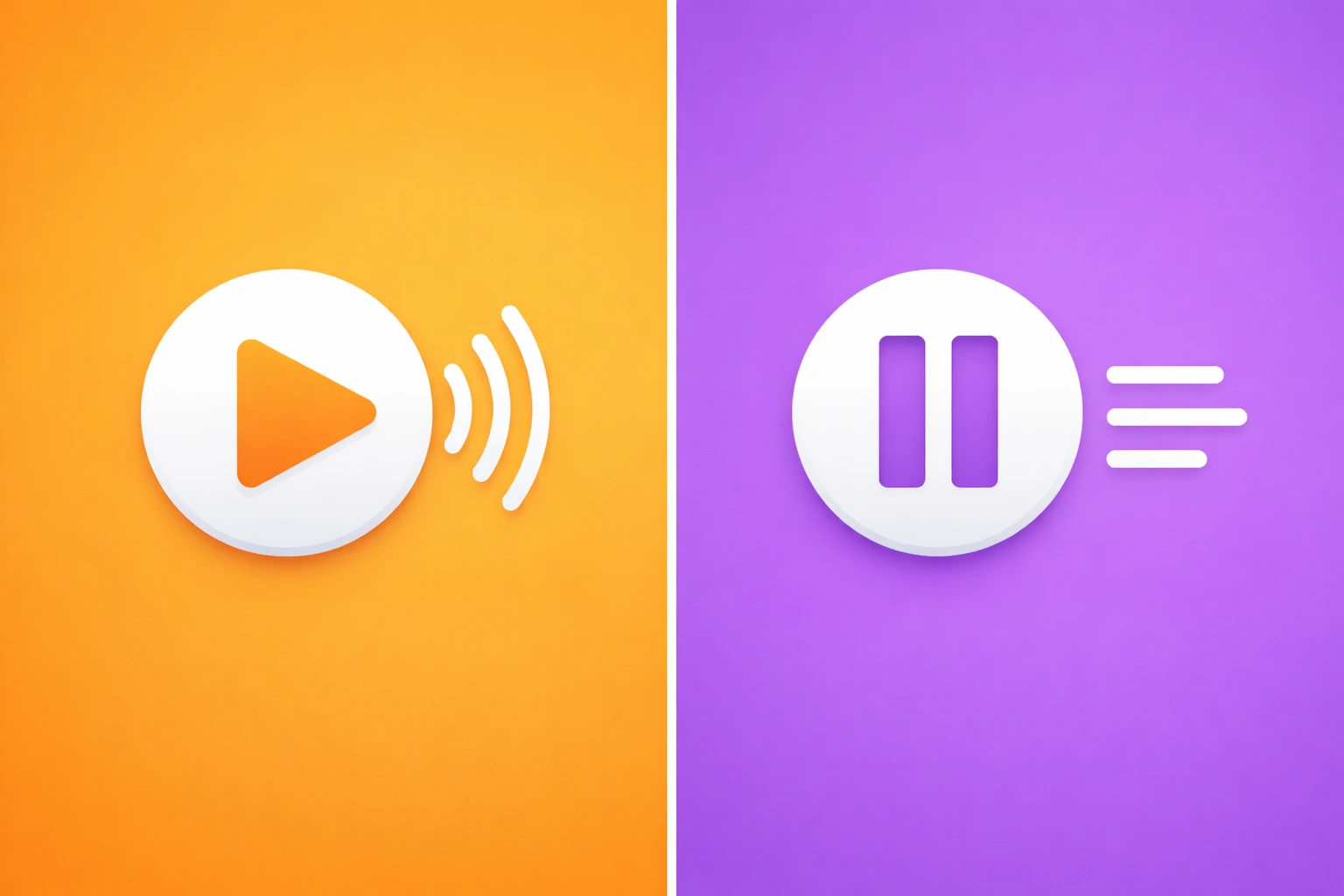
Not all experiences are linear videos. Interactive learning modules, apps, and web-based tools often require descriptions that work with assistive technologies rather than a traditional narration track.
In that case, text-based audio description provides written descriptions of key visual elements that can be read aloud by screen readers or presented in a way that matches how users navigate the experience.
This format is especially useful when:
- Users control the pacing and flow of the content
- Visuals appear dynamically (like pop-ups or interactive charts)
- Accessibility depends on describing interface elements, states, and outcomes clearly
Here's a final overview of how these audio description types compare:
| Type | Timing | Best Use Case | Compliance |
| Standard | Fits in pauses | Movies, interviews, vlogs | WCAG Level AA |
| Extended | Pauses the video | Tutorials, instructional demos | WCAG Level AAA |
| Live | Real-Time | Sports, news, webinars | Legal/Broadcast Standards |
| Text-based | User-triggered / screen reader | Interactive learning, apps, UI flows | WCAG (media alternative, context-dependent) |
Choosing the right type of audio description is the first step. The next is ensuring your content meets the specific legal frameworks required in your region. Let’s look at the standards and requirements that govern these choices.
Standards and Requirements of Audio Descriptions
The tricky part is that requirements depend on where you operate, what kind of content you publish, and who your audience is. As of 2026, three major frameworks shape the requirements for audio descriptions.
WCAG (Web Content Accessibility Guidelines): The Global Standard
If there’s one accessibility standard that matters almost everywhere, it’s WCAG. It’s a technical standard that explains what accessible digital content should look like. It’s also what many companies and regulators use as the benchmark for accessibility audits.
WCAG’s Time-based Media criteria define when audio description is required for pre-recorded video.
WCAG has three levels:
- Level A: basic accessibility
- Level AA: the most common requirement for organizations
- Level AAA: the highest level (more demanding, not always required)
In most real-world cases:
- Standard audio description supports WCAG compliance for pre-recorded video
- Extended audio description may be needed for more complex content (especially at higher levels)
ADA (American with Disabilities Act): The US Civil Rights Standard
The Americans with Disabilities Act (ADA) is one of the most important accessibility laws in the United States.
While the ADA doesn’t list “audio description” as a standalone requirement, it does require equal access and effective communication, which is exactly where accessible video and audio description can become essential.
- Title II (Public Sector): In 2024, the Department of Justice (DOJ) finalized a landmark update clarifying that public entities (including state and local governments, as well as public universities) must ensure their websites and mobile apps are accessible. For large public entities, the compliance deadline is April 24, 2026.
Title III (Private Sector): Even though the ADA’s original text doesn’t explicitly mention “websites,” US courts have consistently treated many businesses as public accommodations, meaning their digital experiences are expected to be accessible. In many cases, WCAG 2.1 Level AA is used as the benchmark for whether a site meets accessibility expectations.
What this means in practice: If your business publishes important video content online (especially content that includes visual-only information), adding accessibility features like audio description can help reduce risk while improving user access.
EAA (European Accessibility Act): The EU Accessibility Requirement
The European Accessibility Act (EAA) is the main accessibility law shaping digital products and services across the European Union. Its goal is to ensure people with disabilities can access essential services more independently, including digital experiences that involve video and multimedia content.
Unlike WCAG, which is a technical standard, the EAA is a legal requirement. That means it can affect not only what you publish, but also what your customers, partners, or procurement teams expect from you.
The deadline: As of June 28, 2025, all new digital products and services sold in the EU (including e-commerce, banking, and e-learning) must meet accessibility requirements.
The requirement: In practice, EAA compliance is closely tied to meeting WCAG 2.1 or WCAG 2.2 Level AA, which is why audio description becomes part of the conversation for accessible video content.
The impact: Even if your company is based in the US or Asia, selling to customers in the EU can still place you under EAA obligations. Non-compliance can lead to serious consequences, including financial penalties and restrictions on operating in the EU market.
The “Micro-enterprise” exemption: The EAA includes an exemption for micro-enterprises. If your business has fewer than 10 employees and an annual turnover or balance sheet total under €2 million, you may be exempt from certain service requirements. Still, working toward compliance is a best practice to future-proof growth and reach a wider audience.
Why should you add audio descriptions?
Beyond compliance, audio description delivers clear benefits for audiences, organizations, and long-term content performance.
Social Impact: Inclusion and Equity
Audio description makes content accessible to people who are blind or have low vision, helping them fully engage with visual media. That's not just a technical fix; it expands participation in society by removing barriers to information, entertainment, and learning.
According to a comprehensive survey by the American Council of the Blind (ACB), 99% of respondents believe that more audio description should be available, highlighting a massive gap between current content production and the needs of the community. [1]

Furthermore, research published in Frontiers in Psychology demonstrates that high-quality audio description significantly enhances "presence", the feeling of being immersed in a story, helping visually impaired audiences experience stronger emotional engagement and clearer spatial understanding.[2]
Business Value: Audience Expansion & Risk Reduction
Adding audio descriptions is also strategic business move that addresses a massive, often overlooked market. The global market for audio description services alone is projected to reach $764 million in 2026, reflecting how seriously corporations are now taking this expansion.
Meanwhile, litigation related to digital inaccessibility is at an all-time high. In the first six months of 2025 alone, 2,014 digital accessibility lawsuits were filed, up 37% year-over-year, highlighting how quickly enforcement pressure is escalating for businesses with inaccessible websites, apps, and digital content. This surge reflects how seriously plaintiffs' firms and courts now view digital inclusion.
SEO & Engagement Benefits
Research shows that accessibility improvements correlate with significant organic search performance gains.
- Accessible websites saw a 23% increase in organic traffic and ranked for 27% more keywords compared with less accessible sites in a large SEMrush study of 10,000 sites.
- Making a site accessible can result in up to 37% more organic traffic, as accessibility practices help search engines recognize and reward quality user experience signals.
Audio descriptions can also support content performance, especially when they’re treated as more than just an extra audio track. While search engines can’t truly “watch” video the way humans do, they can understand the text and metadata surrounding it. That’s why publishing audio description alongside supporting text (such as an AD script) helps turn visual-only information into searchable context.
More importantly, audio description improves the viewing experience itself. When key visuals are narrated clearly, viewers are more likely to stay engaged, follow the storyline or instructions, and finish the content without confusion. In practice, that can translate into stronger retention, fewer drop-offs, and better overall satisfaction, signals that platforms and distribution channels tend to reward over time.
By transforming an audio description track into an indexable text transcript, you provide a rich 'textual roadmap' that search engines use to rank your video for highly specific visual queries.
Who needs audio descriptions?
Audio description is often framed as a feature for blind audiences, but in reality, it supports a wider range of users and use cases. Features designed for accessibility are increasingly used by broader audiences as well, from language learners to multitaskers and people consuming content in audio-first environments. Understanding who benefits most helps you prioritize when audio description is essential.
People with Low or No Vision
Audio description is primarily designed for people who are blind or have low vision. For these viewers, key visual moments (like facial expressions, physical actions, scene changes, or on-screen text) can be completely inaccessible without narration.

Neurodivergent Learners
Audio description can also support neurodivergent learners, including people with ADHD or autism, who may benefit from clearer context and more structured information. When a video relies heavily on visuals to communicate meaning, AD reinforces what’s happening on screen in a direct, linear way.
This can be especially helpful in:
- training and e-learning modules
- instructional demos and walkthroughs
- fast-paced scenes where meaning is conveyed through expressions or body language
"Eyes-Busy" Multitaskers
Not every accessibility need is tied to disability. Many people consume video while their attention is split, such as during commuting, working, cooking, or doing chores. In these “eyes-busy” situations, users may be listening more than watching.
Audio description helps ensure important visual information isn’t missed, even when the viewer can’t focus on the screen the entire time. For content like product demos, training videos, or presentations, that can be the difference between understanding the message and missing the point entirely.
Low-Bandwidth or Audio-Only Users
In real-world viewing conditions, not everyone has perfect internet access or the ability to stream high-quality video. Some users watch on low bandwidth, with reduced resolution, or in situations where visuals are limited or unreliable.
Audio description adds value here by making key visual context available through sound, helping users follow the content even when the video quality drops, or when they’re consuming it in an audio-first way (like background listening).
Now that we’ve covered who benefits from audio description, the next step is making sure it’s actually done well.
What to Include in Audio Descriptions
A strong audio description doesn’t describe everything on screen. It describes what the viewer needs to understand, especially when that information isn’t already communicated through dialogue or sound. The best audio descriptions feel natural, stay concise, and focus on meaning over detail.
Today, tools like Maestra's AI video dubber can also generate audio descriptions quickly and at scale, making the process far more efficient than writing everything manually. Still, the best results come from combining automation with a human review. That’s why keeping a simple checklist is helpful; it ensures your audio descriptions are accurate, complete, and polished before publishing.
✅ Key visual information not conveyed through dialogue
- Silent actions that change the outcome (e.g., hiding, grabbing, unlocking)
- Important gestures (nodding, pointing, shaking head)
- Facial expressions or reactions that shift meaning (smile, fear, hesitation)
- Scene changes not clear from audio (new location/time jump)
- On-screen text that contains key info (names, titles, warnings, stats)
- Visual cues that affect understanding (who enters/leaves, what is revealed)
- Critical objects or details introduced visually (weapon, document, button, chart)
- Visual humor or irony that only works if you see it (e.g., someone rolling their eyes while saying “sure”)
- Speaker identification when it’s unclear (especially off-screen dialogue)
- Branding or logos that matter (only when relevant, like ads or corporate videos)
- Visual comparisons (before/after, progress bars, “step completed” indicators)

✅ Contextual cues: location, actions, expressions
- Where the scene is happening (room, outdoor setting, workplace, public space)
- What characters are doing (movement, interaction, physical behavior)
- Emotional tone shown visually (tension, relief, confusion, excitement)
- Atmosphere cues that change interpretation (dark lighting, chaos, silence)
- Spatial relationships when relevant (across the room, behind her, nearby)
- Visual cause-and-effect (something breaks → reaction → consequence)
- Changes in focus or point of view (close-up of a hand, zoom into a chart, security camera view)
- Group dynamics (crowd reacts, everyone turns, silence spreads)
- Accessibility-critical UI states (error messages, toggles, “recording on,” “submitted successfully”) for digital/product videos
Let's take a look at some good vs. bad audio description examples.
Example 1: Emotional reaction
❌ Bad: “She looks devastated and betrayed.”
✅ Good: “She lowers her eyes, her hands trembling.”
Why it’s better: the good version describes observable details without guessing intent.
Example 2: On-screen text
❌ Bad: “There’s a chart on screen.”
✅ Good: “A bar chart appears. The highest bar is labeled ‘North America: 52%.’”
Why it’s better: it includes the meaningful takeaway, not just the visual existence.
Example 3: Action with impact
❌ Bad: “He does something suspicious.”
✅ Good: “He glances around, then slips the folder into his bag.”
Why it’s better: it stays factual and lets the viewer interpret the tone.
With a clear idea of what to include (and what to leave out), the next step is applying it to real videos.
How to Add Audio Descriptions to Videos with AI
In my experience, the easiest way of creating audio descriptions is using Maestra's audio description generator. Here are the steps to follow:
- Log in to your Maestra account and select Voiceover from the left-side menu.
- Click +New Voiceover and upload your video using your preferred method.
- Toggle on the Audio description option on the right-hand side. (If you want to translate the video’s audio into another language, simply toggle on Translate to another language as well.)
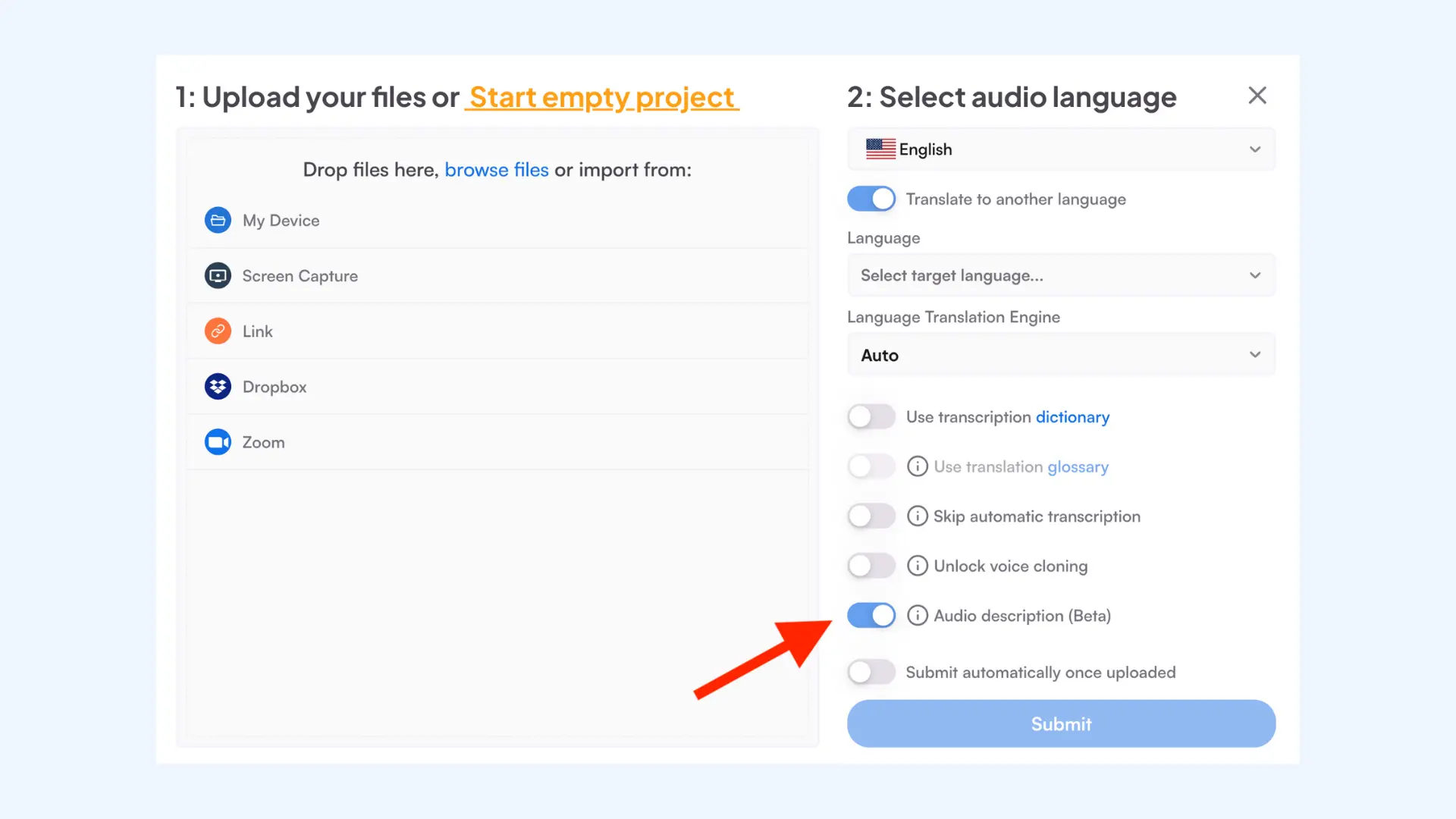
- Click Submit.
- You'll be taken to the editor once your video is processed. On the left side, you’ll see the full transcript, with the audio description lines highlighted in purple.
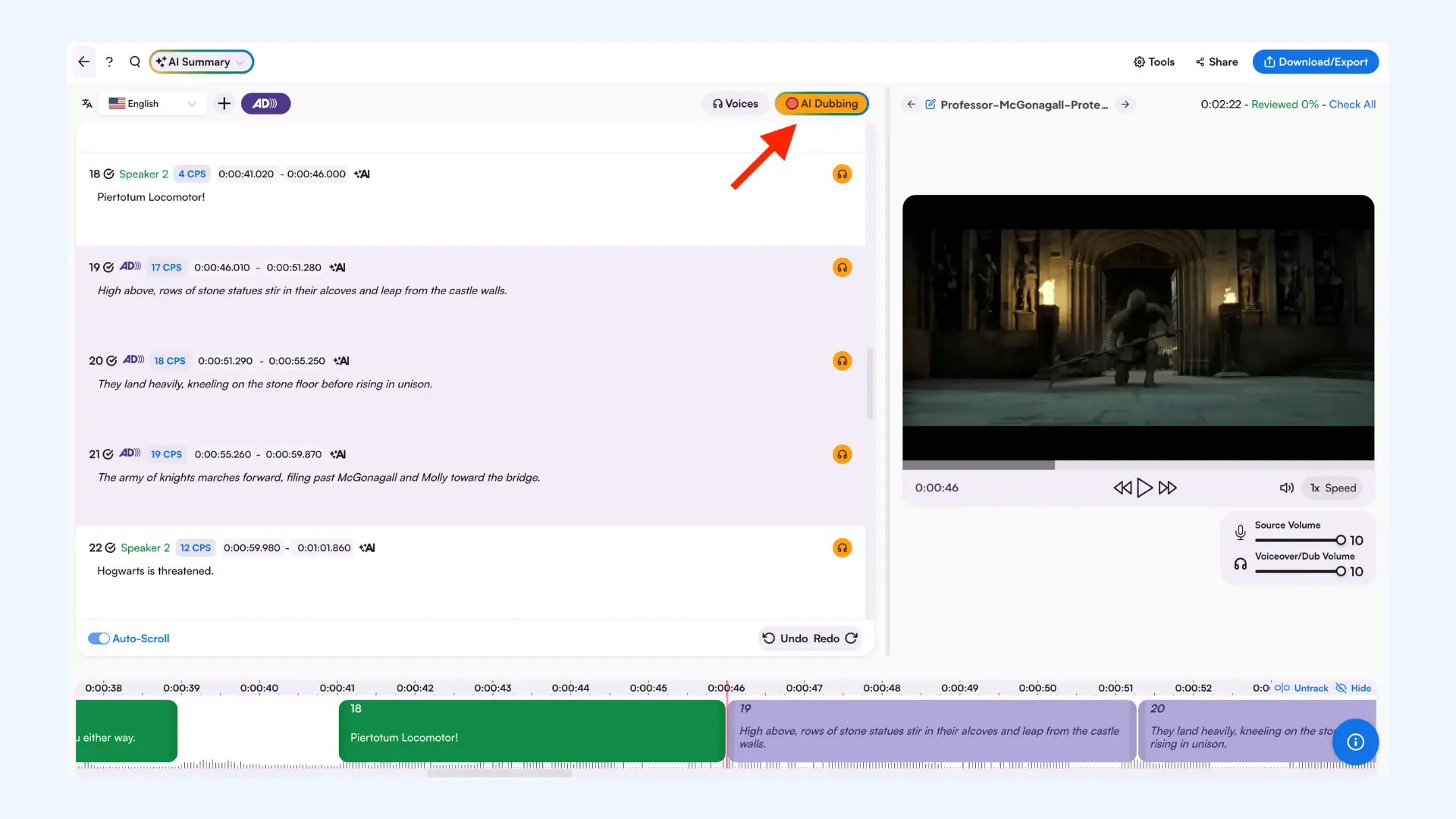
- Here click AI Dubbing and select Audio Description to pick an AI voice for the audio description parts. (Make sure you choose an AI voice for each speaker too.)
- The AI Dubbing button will turn green once the voices are full synthesized. You can then play the video to review the timing and accuracy of the audio descriptions, and make quick edits if anything feels off or overlaps with dialogue.
- Once you’re ready, click Download/Export and select Media in the top-right corner. Make sure the Export with audio description option is checked. Finally, click MP4 Video.
Create Audio Descriptions in 125+ Languages
Best Practices for Adding Audio Descriptions
AI makes audio description faster than ever, but speed doesn’t automatically equal quality. To create descriptions that feel natural, accurate, and easy to follow, you still need to follow a few best practices. These tips will help you combine automation with quality control for the best results.
Plan for AD early (so AI has room to work)
If audio description is added at the very end, AI may generate descriptions that are technically correct but impossible to fit naturally between dialogue. Planning ahead (even lightly) makes the entire process smoother.
Expert tip: Wistia recommends thinking about audio description early in production, since pacing and natural pauses make it easier to integrate descriptions without awkward timing later.
Prioritize meaning over detail
The goal is not to narrate every visual. It’s to describe what the viewer needs to understand when that information isn’t already in the audio.
Expert tip: As WCAG 1.2.5 highlights, audio description should focus on important visual information that isn’t already communicated through dialogue or other audio cues, such as actions, scene changes, and on-screen text that viewers would otherwise miss.
Time descriptions around dialogue
Standard AD should fit into natural pauses so it doesn’t compete with speech or important sound cues. If the content is too dense, extended description may be the better option.
Practical accessibility writing guidance recommends placing descriptions where they won’t overlap dialogue and keeping timing natural for the listener.
Keep the voice neutral, clear, and consistent
When using an AI voice, aim for a delivery that feels clear, steady, and unobtrusive. Choose a natural-sounding voice, keep the pacing slightly slower than normal speech, and avoid overly emotional intonation that can distract from the content.
Most importantly, maintain consistency throughout the video so the audio description feels like a natural layer of support rather than a separate performance.
Always review AD with real playback (not just the script)
Even if the audio description script looks perfect on paper, it can fail in the actual video if the timing is off. Always preview the full video with audio description enabled to confirm that it fits naturally and doesn’t interrupt key moments.
Check for:
- descriptions talking over dialogue or important sound cues
- narration that comes too late (after the action already happened)
- unclear references (“he,” “she,” “this,” “that”) when multiple subjects are on screen
- missing on-screen text or visual transitions that change meaning
A final playback review is the fastest way to catch issues that AI can’t reliably detect.
Validate user feedback whenever possible
If you can, test your audio descriptions with people who actually rely on them. Even a small round of feedback can reveal gaps that aren’t obvious during production, like confusing references, missing context, or descriptions that feel rushed.
Expert tip: Involving users in evaluating web accessibility helps uncover real-world issues that automated tools and internal reviews often miss, especially around clarity, pacing, and whether the description includes the right visual details.
Conclusion
Audio description might sound like a small addition, but it changes the entire experience for people who can’t rely on visuals to follow what’s happening. And once you start paying attention, you realize how many videos depend on silent details, on-screen text, and visual cues that never get spoken out loud.
The good news is that creating audio descriptions doesn’t have to be slow or complicated anymore. With AI, you can generate them quickly, and with a simple checklist and a quick review, you can make sure the final result is actually useful. And for viewers who rely on audio description, that consistency matters more than people realize.
Frequently Asked Questions
What is an AI audio description?
An AI audio description is a narration track generated with artificial intelligence that explains key visual information in a video. It describes elements like actions, scene changes, expressions, and on-screen text that aren’t communicated through dialogue. The goal is to make video content more accessible, especially for blind and low-vision viewers.
Is there an AI audio description generator?
Yes, Maestra offers an AI audio description generator that can create audio descriptions automatically for your videos. You can generate descriptions quickly, review them in the editor, and export the final video with audio description included. The tool supports 125+ languages, which helps if you publish content for international audiences.
What is the difference between AI-powered audio description and human audio description services?
AI audio description helps you generate descriptions quickly while reducing costs at the same time. Human audio description is usually more nuanced, especially when it comes to deciding which visual details matter most. For the best balance of speed and quality, many teams use AI for first and then apply a quick human review before publishing.
How accurate are AI-generated audio descriptions?
AI-generated audio descriptions can be very helpful, but accuracy depends on the video complexity and the quality of the AI model. AI may miss subtle context, misinterpret actions, or describe irrelevant details if the scene is visually dense. That’s why a quick human review is essential before publishing.
How long does it take to create audio description with AI?
It depends on the length and complexity of the video, but AI can usually generate audio description in minutes. The real time investment is the review step, where you check timing, clarity, and whether anything important was missed.
What is the difference between audio description and subtitles?
Subtitles (or captions) display spoken dialogue and important sound cues as text on screen. Audio description is spoken narration that explains visual information that the viewer may not be able to see. They serve different accessibility needs, and many videos benefit from having both.
Do I need an audio description for every video?
Not always, but you should add audio description whenever important information is conveyed visually and isn’t available through audio. For example, tutorials, product demos, and videos with on-screen text often need it. If the dialogue already explains everything essential, audio description may not be necessary.
When is audio description required for WCAG compliance?
Audio description is required under WCAG when prerecorded video includes important visual information that isn’t communicated through the original audio. In practice, WCAG Level AA is the most common compliance target for organizations. While Level A allows for a text transcript as an alternative, Level AA strictly requires the audio track itself, making it the benchmark for most legal and corporate accessibility policies.
How can I create an audio description for a video?
You can easily create audio descriptions for a video with Maestra's audio description generator. After you upload your video, you can enable the audio description option and generate it with AI in minutes. After a quick playback check, you can export the video with audio description included.
Do audio descriptions affect my video's SEO?
Absolutely. While search engines can't "watch" your video, they can index the text from your audio description script. By providing a descriptive transcript alongside your video, you allow search engines to understand the visual context, which can significantly improve your rankings for relevant keywords.